 Menu
Menu
AWS SOC 2 compliance is the process by which a company using Amazon Web Services (AWS) demonstrates that its systems and controls meet the Trust Services Criteria established by the American Institute of Certified Public Accountants (AICPA). This involves implementing specific configurations, policies, and procedures within the AWS environment to satisfy security, availability, confidentiality, processing integrity, or privacy requirements. The process culminates in an audit by an independent CPA firm, which produces a SOC 2 report attesting to the company’s controls, not those of AWS itself.
This distinction is the most critical concept for teams building on AWS. While AWS maintains its own SOC 2 compliance for the security of the cloud (its global infrastructure), your company is solely responsible for security in the cloud. Your auditor will focus exclusively on the controls you implement within your AWS account. This guide provides actionable steps for configuring AWS services, mapping them to SOC 2 criteria, and preparing the evidence required for a successful audit.
The AWS Shared Responsibility Model: Defining Your Audit Scope
The AWS Shared Responsibility Model is the foundational concept that defines the scope of your SOC 2 audit. It delineates which security and compliance responsibilities belong to AWS and which belong to you, the customer. AWS is responsible for the security of the cloud, which includes the hardware, software, networking, and facilities that run AWS Cloud services. You are responsible for security in the cloud, which encompasses your data, platform, applications, identity and access management, and the configuration of AWS services.
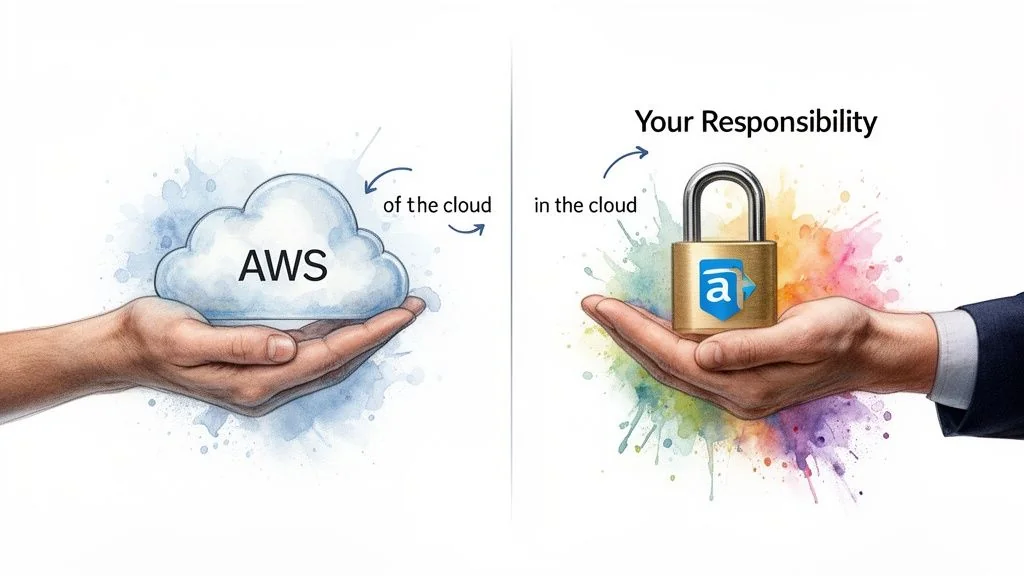
Why does this matter for someone pursuing SOC 2? Your SOC 2 auditor will not re-audit AWS’s data centers or physical infrastructure; they will accept the AWS SOC 2 report as evidence for those controls (a concept known as inheriting controls). The audit’s entire focus will be on your configurations, policies, and procedures within your AWS environment. Misunderstanding this division of responsibility is a primary cause of failed audits, as it leads to significant control gaps. You must prove to your auditor that you have implemented the necessary controls for the portion of the technology stack you manage.
AWS Shared Responsibility Model for SOC 2
This table provides specific examples of how responsibilities are divided in the context of a SOC 2 audit. Use it to focus your control implementation and evidence collection efforts on the areas your auditor will test.
| Control Area | AWS Responsibility (Security OF the Cloud) | Customer Responsibility (Security IN the Cloud) |
|---|---|---|
| Physical Security | Managing data center access, environmental controls, and secure hardware disposal. | Not applicable; you inherit these controls and evidence them with the AWS SOC 2 report. |
| Infrastructure | Securing the global network, compute, storage, and database services at the hardware and virtualization layer. | Configuring your Virtual Private Cloud (VPC), subnets, security groups, and network ACLs to restrict network traffic. |
| Identity & Access | Providing the IAM service framework for creating users, roles, and policies. | Defining and enforcing least-privilege access, mandating MFA, and conducting quarterly user access reviews to meet CC6.1. |
| Data Security | Offering encryption services like KMS and secure storage options like S3. | Enabling encryption at rest for all data stores (e.g., EBS, RDS, S3) and in transit (using TLS). You are responsible for managing your own encryption keys. |
| Monitoring & Logging | Providing services like CloudTrail and CloudWatch to enable logging. | Configuring, enabling, and actively monitoring those logs. You must configure and respond to alerts for suspicious activity to satisfy CC7.2. |
Your success in a SOC 2 audit depends on demonstrating robust controls in the cloud. Your auditor will require specific evidence—such as CloudTrail logs, IAM policies, and security group configurations—to prove you are responsibly managing your portion of the AWS environment.
Using AWS Artifact to Inherit Controls
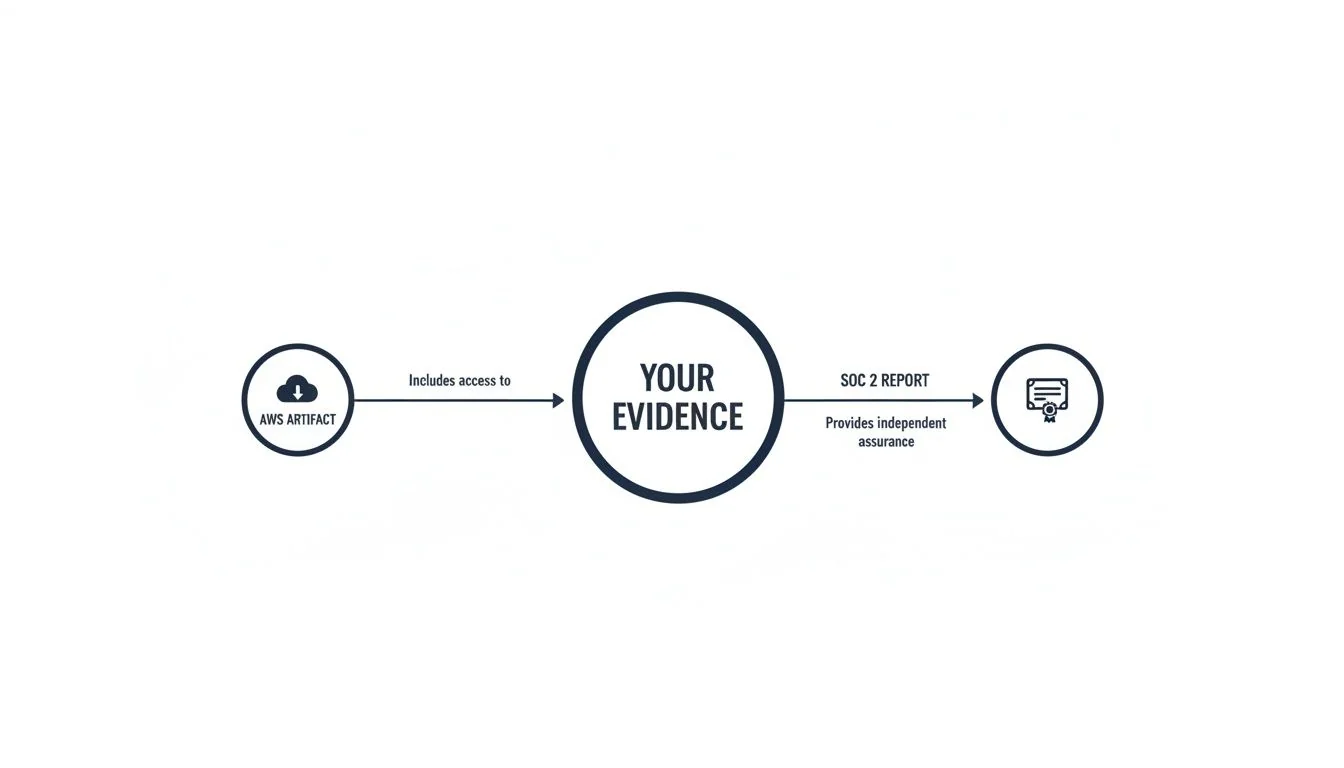
AWS Artifact is a self-service portal within the AWS Console that provides on-demand access to AWS’s compliance reports. For your SOC 2 audit, it is the primary tool for obtaining the evidence needed to demonstrate the security of the underlying AWS infrastructure.
Why does this matter for someone pursuing SOC 2? Using AWS Artifact is a mandatory step. It directly satisfies the AICPA criterion CC9.2 (part of the vendor management requirements), which requires you to assess risks associated with your vendors. By downloading and providing the AWS SOC 2 Type 2 report to your auditor, you furnish the evidence that AWS’s physical and environmental controls have been independently verified. This allows the auditor to “inherit” these controls and focus the audit exclusively on your responsibilities.
How to Use AWS Artifact for Your Audit
The primary document you need for your AWS SOC 2 compliance audit is the AWS Service Organization Control (SOC) 2 Type 2 Report.
- Log in to the AWS Console and navigate to the AWS Artifact service.
- Search for the Report: In the reports dashboard, search for “SOC 2 Type 2.” You will see reports for different periods.
- Download the Correct Report: Select the most recent report that covers the time period of your own audit. You will need to accept a Non-Disclosure Agreement (NDA) before downloading the PDF, as it contains sensitive information about AWS’s internal controls.
Once downloaded, this report becomes a critical piece of your evidence package. It proves you have performed due diligence on your most critical subservice organization (AWS) and dramatically narrows the scope of what your auditor needs to test.
Understanding Report Timing and Service Scope
The dates on compliance evidence are critical for an audit. AWS undergoes SOC audits semi-annually, with reporting periods typically ending on March 31 and September 30. This frequent cycle ensures you always have a current report to align with your own audit window. You can monitor announcements about new reports, like the recent ones covering over 185 services, on the AWS Security Blog. Before using a new AWS service, you must also verify it is covered under AWS’s SOC 2 report by checking the AWS Services in Scope by Compliance Program page. Using a service not in scope may require you to implement additional compensatory controls.
Mapping SOC 2 Criteria to AWS Services
Achieving SOC 2 compliance on AWS requires translating the abstract AICPA Trust Services Criteria into concrete, auditable controls within your cloud environment. This mapping exercise is the blueprint for your compliance program, connecting each applicable SOC 2 requirement to a specific AWS service, configuration, and the evidence it produces.
Why does this matter for someone pursuing SOC 2? Without a clear mapping, you cannot prove to an auditor how your technical configurations satisfy the SOC 2 criteria. This process is not optional; it is the core of your audit preparation. A well-documented map provides your engineering team with a clear implementation guide and gives your auditor a roadmap for testing. Failing to perform this mapping will lead to control gaps discovered during the audit—the most expensive and time-consuming place to find them.
Mapping the Common Criteria (Security) to AWS Services
The Common Criteria (CC series), which constitute the Security principle, are mandatory for all SOC 2 audits. Here are specific examples of how to map key criteria to AWS services.
CC6.1 - Logical Access: The entity implements logical access security software, infrastructure, and architectures to protect information assets from security events to meet the entity’s objectives.
- AWS IAM (Identity and Access Management): This is the primary service for access control. You must implement and provide evidence of IAM policies that enforce the principle of least privilege. For an audit, this means providing exported IAM policies and screenshots showing that users and roles have only the minimum permissions necessary.
- MFA (Multi-Factor Authentication): Enforce MFA on all human user accounts, especially the root account and administrative roles. Auditors will request evidence, such as a screenshot of the IAM credential report, showing MFA is enabled.
- User Access Reviews: To meet CC6.3, you must conduct and document periodic reviews of user access. Evidence includes a signed-off spreadsheet or a report from a compliance automation tool showing that access rights were reviewed and approved by management.
CC7.2 - Monitoring: The entity monitors system components and the operation of those components for anomalies that are indicative of malicious acts, natural disasters, and errors affecting the entity’s ability to meet its objectives; and evaluates and responds to anomalies when they are detected.
- AWS CloudTrail: Must be enabled in all regions to create an immutable audit log of all API calls. Evidence is a screenshot of the CloudTrail configuration showing it is multi-region and logs are sent to a secure, access-restricted S3 bucket.
- Amazon CloudWatch: Used to create alerts on CloudTrail events. For an audit, you must provide screenshots of specific CloudWatch Alarms you have configured (e.g., for root user logins, IAM policy changes, or security group modifications) and demonstrate that an alert response procedure is in place.
Mapping SOC 2 Criteria to Core AWS Services
This table provides a quick-reference for mapping common requirements to specific AWS services and the evidence an auditor will expect.
| Trust Services Criterion (Example) | Control Objective | Primary AWS Service(s) | Required Configuration/Evidence |
|---|---|---|---|
| Security (CC6.1) | Restrict logical access to information assets. | AWS IAM, AWS SSO | Exported IAM policies demonstrating least privilege; screenshots of user roles and permissions; evidence of quarterly user access reviews. |
| Security (CC7.2) | Monitor systems to detect changes and anomalies. | AWS CloudTrail, Amazon CloudWatch | Screenshots proving CloudTrail is enabled for all regions; screenshots of specific CloudWatch alarms for critical security events (e.g., root login). |
| Availability (A1.2) | Implement a disaster recovery and system backup plan. | AWS Backup, Multi-AZ deployments | Screenshots of automated backup plans in AWS Backup with defined retention periods; architecture diagrams illustrating Multi-AZ redundancy. |
| Confidentiality (C1.2) | Protect confidential information throughout its lifecycle. | AWS KMS, Amazon S3, Amazon EBS | Screenshots showing server-side encryption is enabled on S3 buckets and EBS volumes; screenshots of KMS key policies restricting access. |
Mapping Availability and Confidentiality Controls
If your audit scope includes the Availability or Confidentiality criteria, you must map additional controls.
For Availability (A1.2), which concerns disaster recovery and backups:
- AWS Backup: Implement automated backup plans for critical data stores (EBS, RDS, DynamoDB). Evidence includes screenshots of these backup plans and their retention policies.
- Multi-AZ Architecture: Deploy critical infrastructure across multiple Availability Zones to ensure high availability. Evidence is typically an architecture diagram and configuration screenshots from the AWS Console.
- Restore Testing: Backups are insufficient without proof they work. You must conduct and document periodic restore tests. Auditors will request the records of these tests, including the date, personnel involved, and outcome.
For Confidentiality (C1.2), which concerns protecting data from unauthorized disclosure:
- Encryption at Rest: Enable server-side encryption on all services storing sensitive data, such as Amazon S3, Amazon EBS, and Amazon RDS. Evidence is a series of screenshots from the AWS Console confirming that encryption is enabled.
- Encryption in Transit: Enforce TLS for all data in motion. This is often managed via an Application Load Balancer (ALB) listener configuration. Evidence is a screenshot of the ALB configuration requiring HTTPS.
- AWS Key Management Service (KMS): Use customer-managed keys in KMS to gain granular control over your encryption. Auditors will request to see your key policies to verify that access is appropriately restricted.
This methodical mapping of criteria to AWS services is the core of audit readiness. It transforms abstract requirements into a concrete, auditable security program.
Automating Evidence Collection in AWS
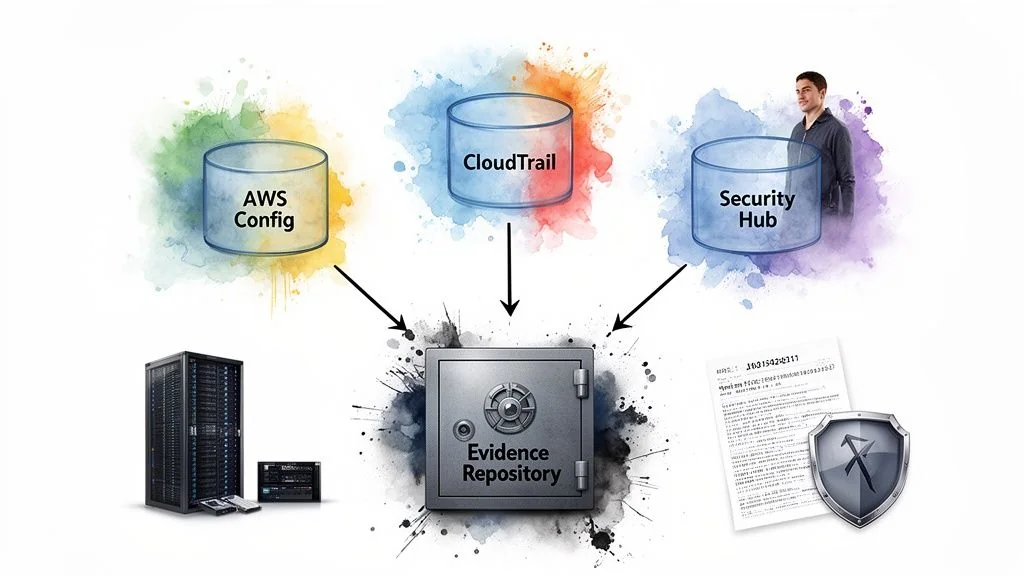 A SOC 2 Type 2 audit requires evidence that your controls have been operating effectively over a period of time (typically 6-12 months). Manual evidence collection via screenshots is insufficient, error-prone, and fails to demonstrate continuous monitoring. Automating evidence collection is therefore a requirement for an efficient and successful audit.
Why does this matter for someone pursuing SOC 2? Automated evidence collection provides your auditor with continuous, immutable proof that your controls are functioning as designed. It demonstrates program maturity and shifts your team’s effort from reactive, manual data gathering to proactive monitoring and improvement. Services like AWS Config, CloudTrail, and Security Hub are essential for building a robust, automated evidence repository that will satisfy auditor requirements for a Type 2 report.
Using AWS Config for Continuous Configuration Auditing
AWS Config is the primary tool for automating the collection of configuration-related evidence. It continuously monitors and records your AWS resource configurations, allowing you to automate the evaluation of those configurations against desired policies.
For a SOC 2 audit, you can deploy AWS Config rules that map directly to specific controls. For instance, to meet Confidentiality (C1.2), you can enable the s3-bucket-public-read-prohibited managed rule.
- Evidence: The AWS Config dashboard provides a historical record showing that this rule has been active and that no non-compliant resources (public S3 buckets) existed during the audit period. This is far stronger evidence than a single, point-in-time screenshot. Other critical rules to enable include
iam-root-access-key-checkandencrypted-volumes.
Creating an Immutable Audit Log with AWS CloudTrail
While AWS Config records the state of resources, AWS CloudTrail provides an immutable log of all API activity (“who did what, and when”) within your AWS account. This is a critical source of evidence for change management, access control, and incident investigation.
For CloudTrail to be considered audit-ready, you must:
- Enable it in all regions: This ensures complete visibility of all actions taken in the account.
- Enable Log File Validation: This provides mathematical assurance that the log files have not been tampered with after delivery.
- Store logs in a dedicated, secure S3 bucket: This bucket should have restricted access policies and object lock enabled to ensure immutability.
Why does this matter for your SOC 2? When an auditor tests your change management control (CC8.1), you can provide CloudTrail logs showing the exact API calls, the IAM principal that made the change, and the timestamp, correlating it with your change request ticket. This is definitive, objective evidence.
Aggregating Findings with AWS Security Hub
Managing findings from multiple AWS security services can be overwhelming. AWS Security Hub centralizes security findings from services like Amazon GuardDuty, Amazon Inspector, and AWS Config into a single, standardized format. It also runs automated security checks against benchmarks like the CIS AWS Foundations Benchmark.
For your SOC 2 audit, Security Hub provides a high-level dashboard of your compliance posture. You can use its findings to generate evidence for a wide range of controls. Techniques like automated data extraction can then be used to pull this information into a compliance tool or evidence repository. For a deeper look at building an evidence strategy, consult a SOC 2 evidence collection guide. By automating evidence collection with these native AWS tools, you create a system of continuous compliance that makes your audit a simple validation exercise rather than a scramble for documentation.
Scoping Your Audit in an AWS Environment
Defining the scope of your SOC 2 audit is a critical initial step that determines which systems, AWS accounts, services, and personnel will be subject to testing against the chosen Trust Services Criteria. A well-defined scope is essential for controlling audit costs, focusing team efforts, and producing a report that is relevant to your customers.
Why does this matter for someone pursuing SOC 2? An improperly defined scope can be catastrophic. If it is too narrow, the resulting report may be rejected by enterprise customers because it excludes critical systems. If it is too broad, the audit will become unnecessarily complex, time-consuming, and expensive. The scoping process forces you to formally document your system’s boundaries, which is a requirement for the system description section of your SOC 2 report.
Deciding on Your Multi-Account Strategy
Most organizations on AWS use a multi-account strategy with AWS Organizations to isolate workloads. This architecture directly impacts your audit scope. The fundamental principle for scoping is to follow the data.
The best practice is to scope in:
- The production AWS account(s): This is non-negotiable, as it is where customer data is processed and stored.
- Shared services accounts: Any account providing critical support to production, such as centralized logging, security tooling (e.g., a Security Hub aggregator account), or identity management, must be included.
- Infrastructure-as-code (IaC) deployment pipelines: The CI/CD pipelines that have permissions to deploy changes to the production environment must be in scope to satisfy change management controls (CC8.1).
Development and sandbox accounts can and should be excluded, provided they are logically and operationally separate from production and contain no customer data.
Defining Geographic and Service Boundaries
The next scoping decision involves AWS Regions and services. Again, the principle is to follow the data.
Scope in only the AWS Regions where customer data is stored or processed. If your application serves European customers and their data is contractually obligated to remain in the
eu-central-1(Frankfurt) region, there is no need to includeus-east-1in your audit scope. This significantly reduces the evidence collection burden.
As data residency becomes more critical globally, aligning with cloud provider offerings that address this can simplify compliance. For instance, the AWS European Sovereign Cloud is designed to meet strict EU data residency requirements, and aligning with a cloud provider that bundles these certifications can streamline your own audit evidence.
Finally, be explicit about the specific AWS services that are in scope. If your application relies on AWS Lambda, Amazon EKS, or ECS, these must be listed in your system description. Your auditor will focus on the controls you have implemented to secure these services, such as function permissions and container security scanning. A precisely defined scope ensures your team focuses its limited resources on the controls that truly matter for your audit.
Preparing for Your AWS SOC 2 Audit
Preparation is the final and most crucial phase that bridges the gap between implementing technical controls in AWS and achieving a successful SOC 2 report. This stage involves organizing evidence, refining documentation, and engaging with an auditor to ensure a smooth and efficient audit process.
Why does this matter for someone pursuing SOC 2? Poor preparation leads to audit delays, unexpected findings, and increased costs. A well-prepared organization can significantly shorten the audit timeline and improve the likelihood of a “clean” (unqualified) opinion. This final phase is where you prove not only that your controls are designed correctly but that you have the operational discipline to manage and evidence them effectively.
Conduct a Readiness Assessment
Before beginning a formal SOC 2 audit, it is essential to conduct a readiness assessment. This is a pre-audit engagement, often with the same firm that will perform the final audit, designed to identify control gaps and areas of weakness.
The readiness assessment is your most valuable tool for de-risking the audit. A consultant will perform a high-level review of your controls and documentation against the SOC 2 criteria, providing a detailed report of gaps that must be remediated before the official audit begins. This process typically involves:
- Finalizing the audit scope: Confirming the systems, AWS accounts, and criteria to be included.
- Reviewing documentation: Assessing your system description, policies, and procedures.
- Performing sample testing: Examining key controls like user access reviews and change management to identify gaps in evidence.
A detailed guide on the SOC 2 readiness assessment can provide more context. This step turns the audit from a high-stakes exam into a manageable project with a clear roadmap for success.
Refine Your System Description and Policies
The system description is the narrative portion of your SOC 2 report. It explains to the reader (including your customers) what the system does, the services it provides, and how its components work together to meet the Trust Services Criteria. This document, along with your internal policies, forms the basis of the audit.
Before the audit, you must ensure your system description is complete and accurate. You must also finalize all supporting policies, such as an Information Security Policy, Access Control Policy, and Change Management Policy. Creating a clear and accessible policy and procedure manual is a non-negotiable step that demonstrates to auditors that your controls are formalized and communicated.
Choose an Auditor with AWS Expertise
Not all audit firms are created equal, especially in the context of cloud-native environments. Selecting an audit firm with deep, demonstrable expertise in AWS is a critical success factor.
An AWS-savvy auditor understands:
- The Shared Responsibility Model and how to leverage the AWS Artifact report.
- How to interpret evidence from AWS Config, CloudTrail, and Security Hub.
- The architecture of serverless and container-based applications on services like Lambda and EKS.
This expertise prevents you from wasting time explaining fundamental cloud concepts and allows the auditor to perform a more efficient and targeted audit, often resulting in lower costs and a faster timeline. An auditor who speaks the language of AWS can act as a true partner in validating your control environment.
Ultimately, successful AWS SOC 2 compliance is a function of both technical implementation and rigorous preparation. By implementing controls using native AWS tools, automating evidence collection, and meticulously preparing your documentation and processes for the audit itself, you build a direct and defensible path to a successful SOC 2 report. This final phase of preparation is what ensures your hard work translates into a valuable attestation that you can use to build trust with your customers.