 Menu
Menu

On this page
SOC 2 never says “you must enable MFA” as a standalone sentence, yet auditors routinely treat missing MFA on critical access as a serious control problem. That’s not a contradiction. It’s how soc 2 multi factor authentication requirements work in practice: the standard requires strong logical access controls, and for privileged access, production systems, and sensitive data, password-only authentication often won’t survive audit scrutiny. One reason is straightforward. 81% of hacking-related breaches involved stolen or weak passwords according to the 2020 Verizon Data Breach Investigations Report cited here.
That gap between the written criterion and the audit expectation is where many organizations fall short. They hear “not explicitly required,” then roll out MFA only for a subset of users, or only on the main web login, or only for employees and not contractors. The result is usually the same: the auditor follows the access paths that matter, finds a bypass, and writes it up.
Defining Multi Factor Authentication in a SOC 2 Context
Password plus a login screen is not a SOC 2 access control strategy. In audit terms, multi-factor authentication means a user must prove identity with at least two different factor types before getting access to a system, application, or data. The usual categories are something the user knows, something the user has, and something the user is.
For SOC 2, the useful question is scope. Auditors test whether MFA is enforced on the access paths that can affect the Security criteria, not whether your stack advertises MFA as a feature. A tenant-wide setting that covers workforce SSO but leaves VPN, cloud consoles, shared admin accounts, or contractor access outside policy will not hold up well once testing starts.
That is the practical definition in a SOC 2 context. MFA is a logical access control that helps satisfy the expectation behind CC6.2 and related criteria by reducing the chance that a stolen password turns into unauthorized access. If an account can administer production, manage identities, reach infrastructure, or view sensitive customer data, auditors usually expect MFA or a documented compensating control that is specific, enforced, and evidenced.
What Auditors Test
Auditors usually focus on three points:
- Enforcement: MFA is required by policy and enforced in the identity provider, VPN, cloud platform, and other in-scope entry points.
- Scope: Coverage includes the user types and systems that create risk, including employees, contractors, privileged users, remote access, and break-glass accounts where applicable.
- Evidence: You can produce policy settings, screenshots, configuration exports, access reviews, and authentication logs that show the control operated during the review period.
Service accounts are where teams often get sloppy. Auditors generally do not expect MFA on non-interactive service accounts that cannot complete an MFA challenge, but they do expect those accounts to be tightly scoped, excluded from human sign-in, monitored, and protected with compensating controls such as key management, vaulting, rotation, and restricted permissions. If a so-called service account is used interactively by an engineer, it is not really a service account for audit purposes.
If your team needs a technical baseline for terminology and implementation patterns, Monito’s documentation on general authentication principles is a useful reference before you document what is in scope and gather evidence.
A simple rule works well here. If a login can materially change systems or expose data, put it in MFA scope first and argue for exclusion only with documented evidence.
Mapping MFA to SOC 2 Trust Services Criteria
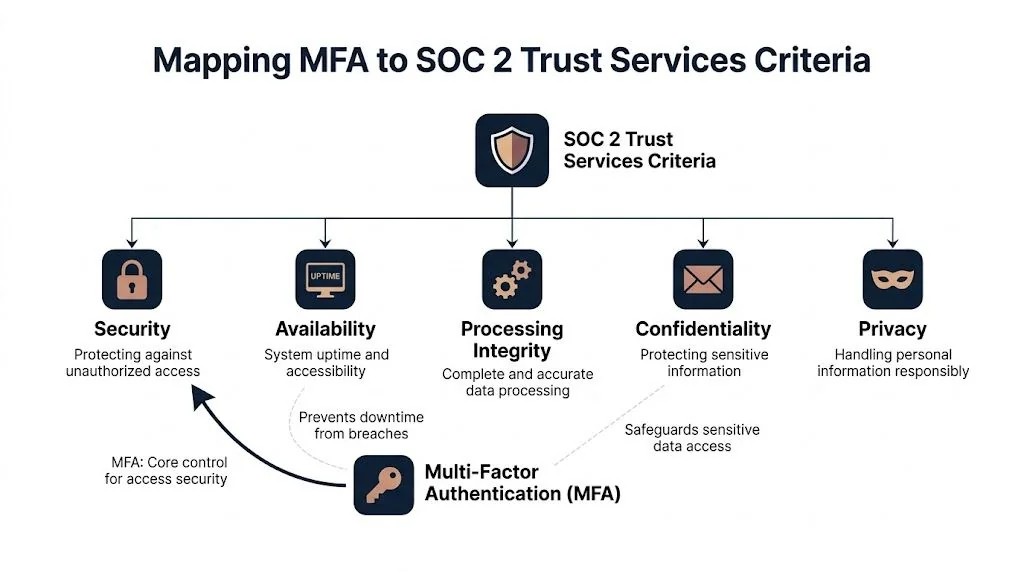
Most MFA disputes in audits disappear once you map the control back to the text auditors use. The center of gravity is the Security category, especially CC6.2 and CC6.3.
CC6.2 and identity verification
CC6.2 is about restricting logical access to authorized users. In plain audit language, that means you need a reliable way to confirm the person logging in is the person who should be logging in.
That’s where MFA becomes hard to avoid. Konfirmity’s write-up notes that CC6.2 emphasizes “multi-factor verification with biometric and token-based checks” to confirm user identities, which is exactly the kind of language auditors lean on when they ask for your identity provider settings and access policy evidence. The same source explains that single-factor passwords alone for admin or production access are deemed a significant deficiency, and findings can delay your SOC 2 report by 1 to 3 months.
CC6.3 and changes to access
CC6.3 deals with the design and implementation of logical access security measures. In practice, auditors test whether access is provisioned, changed, and removed in a controlled way.
MFA matters here because access changes are high-risk moments. If a user gets increased privileges, joins the production support group, or receives new repository permissions, the auditor wants to see that stronger authentication applies to that role. A policy that says “admins use MFA” but an identity system that doesn’t enforce MFA after privilege changes is a weak design.
Availability and Confidentiality tie-ins
MFA maps most directly to Security, but it also supports adjacent control objectives:
| TSC area | Why MFA matters |
|---|---|
| Security | Prevents unauthorized access to systems and identities |
| Availability | Reduces the chance that account takeover leads to service disruption |
| Confidentiality | Adds protection around access to sensitive customer and internal data |
Auditors don’t test MFA as an isolated feature. They test it as part of your logical access control system.
The audit framing you should use internally
If your team still treats MFA as an IT setting, that’s too narrow. For SOC 2, MFA is part of a control chain:
- Identity is established
- Access is restricted by role
- Higher-risk access requires stronger authentication
- The system logs what happened
- Management can review and defend the evidence
That framing matters because it shifts the conversation from “which app should we use?” to “which access paths create audit exposure?”
How to Scope Your MFA Implementation for an Audit
Most audit failures aren’t caused by choosing the wrong MFA vendor. They happen because the company scoped the rollout badly. MFA was enabled in Okta or Microsoft Entra ID, but not on a legacy cloud console, not on VPN, not for contractors, or not on the backup admin account.

Start with access paths, not user populations
A clean scope begins with a simple question: which accounts can materially affect the in-scope system?
That usually captures more than employees. It often includes founders, engineers, DevOps staff, customer support leads, finance users with billing access, contractors, managed service providers, and vendor support personnel.
Use this decision pattern:
- Privileged access: Any admin role should be in scope.
- Production access: Shell, console, Kubernetes, CI/CD, deployment tooling, and cloud control plane access should be in scope.
- Sensitive data access: Systems that expose customer data, secrets, backups, or audit logs should be in scope.
- Remote access: VPN, remote desktop gateways, bastions, and identity portals should be in scope.
- Code and release paths: Source code repositories and release pipelines should be in scope when they can alter production behavior.
User types that need explicit decisions
The scope falls apart when teams leave gray areas unresolved. These are the ones auditors ask about.
Human admins and engineers
This is the easy one. If a person can administer systems, view production data, or deploy code, enforce MFA.
Don’t rely on role labels alone. A “support” role in Zendesk or Stripe can still expose customer information or account controls. Auditors follow permissions, not job titles.
Contractors and third parties
If they use your accounts, your VPN, your cloud tenant, or your support tools, they’re in scope. “They work for another company” is not a control.
Document who approves third-party access, how MFA is enforced for them, and how offboarding works when their engagement ends.
Executives and founders
These accounts are often overlooked because nobody wants to inconvenience leadership. That’s a mistake. Founders and executives often hold broad administrative rights across cloud, finance, HR, and identity systems.
Exempting them is one of the fastest ways to turn a good access policy into a weak one.
The tricky cases auditors still care about
Service accounts don’t authenticate the same way humans do, so MFA usually isn’t the right control for them. But they still need compensating safeguards such as restricted permissions, secret management, rotation, monitored usage, and no interactive login.
Internal-only tools require judgment. If the tool has low-risk content and no path to in-scope systems, MFA may not be necessary. If it can pivot into administrative action or expose sensitive data, “internal only” won’t save it.
What good scope looks like
A defensible MFA scope usually has these characteristics:
- Named system list: Identity provider, cloud platforms, VPN, source code, support tools, production consoles, and critical SaaS apps are listed.
- Role mapping: Each system shows which user groups require MFA.
- Exception handling: Temporary exceptions are approved, time-bound, and documented.
- Alternative controls: Non-human accounts are covered by documented compensating controls.
- All access routes covered: Browser login, CLI, remote access, SSO entry points, and break-glass access are all addressed.
If you can say “MFA is on for almost everyone,” you probably haven’t scoped it tightly enough for an audit. The auditor will ask who’s excluded and why.
Acceptable MFA Factors and Evidence for Auditors
Auditors don’t certify products. They evaluate whether your chosen MFA method is appropriate for the risk, enforced consistently, and supported by evidence. A mediocre method with strong enforcement and clean logs often audits better than a stronger method deployed inconsistently.
The factor types in practical terms
There are three common factor categories used in SOC 2 environments:
- Knowledge factor: Something the user knows, such as a password or PIN.
- Possession factor: Something the user has, such as a TOTP app, hardware token, or passkey device.
- Inherence factor: Something the user is, such as fingerprint or face recognition on a managed device.
For audit purposes, the strongest patterns usually combine a password with a possession factor, or use phishing-resistant modern authentication where supported.
MFA methods comparison for SOC 2 audits
| MFA Method | Factor Type | Auditor View | Best For |
|---|---|---|---|
| TOTP app | Possession | Widely accepted when enforced centrally and logged well | Workforce access through Okta, Google Workspace, Microsoft Entra ID |
| Push notification | Possession | Common and generally acceptable if approvals are logged and fatigue risks are managed | Managed employee devices |
| FIDO2 hardware token or passkey | Possession / strong modern auth | Strongest option for high-risk systems and increasingly favored by auditors | Admins, cloud root-equivalent roles, production access |
| Biometric on managed device | Inherence, often paired with device possession | Acceptable when integrated through a supported identity platform and tied to device controls | Laptop and mobile workforce |
| SMS code | Possession | Often accepted for lower-risk use cases, but more likely to be challenged for high-risk systems | Transitional rollouts, lower-risk external flows |
Scytale notes that auditors are increasingly pushing for phishing-resistant MFA such as FIDO2/passkeys, and that trend is tied to a 300% rise in credential stuffing attacks. The same source also notes that TOTP apps are widely accepted, while SMS-based MFA may draw scrutiny for high-risk systems. Their practical point is the right one: you need to demonstrate enforcement and clear audit trails regardless of method.
For teams weighing the trade-offs of phone-based verification in broader identity workflows, this overview of secure SMS verification services is a useful technical reference. Just don’t confuse availability with audit suitability for privileged access.
The evidence package auditors expect
A strong control can still fail testing if you can’t prove it operated. Build your evidence set before fieldwork starts.
Configuration evidence
Collect screenshots or exported settings showing:
- MFA policy enforcement in Okta, Duo, Microsoft Entra ID, JumpCloud, Google Workspace, or your chosen IdP
- Group or role assignments that tie MFA to admins, production users, contractors, and remote access users
- Conditional access rules for high-risk applications
- Exception settings and who approved them
Operating evidence
Auditors usually want to see records that the control ran during the audit period:
- Successful MFA challenge logs
- Failed MFA challenge logs
- New device enrollment or factor registration records
- Access events tied to privileged or production roles
- Offboarding evidence showing access removal and revocation behavior
Policy and governance evidence
You also need the written layer:
- Access control policy
- MFA standard or authentication policy
- Joiner, mover, leaver procedure
- Exception register
- Access review records
If you’re building the evidence binder from scratch, this SOC 2 evidence collection guide is a practical checklist for organizing screenshots, exports, policy artifacts, and testing samples before the auditor asks.
Strong MFA evidence is boring on purpose. Clear settings, named users, dated logs, approved exceptions. That’s what passes.
Common MFA Audit Failures and How to Avoid Them
The failures are usually predictable. The company “has MFA,” but the control doesn’t cover the access path the auditor tests.
A KnowBe4 survey found that 62% of small to mid-sized organizations neglect MFA for user accounts, and that gap shows up directly in first-time SOC 2 audits when coverage is incomplete, as summarized in JumpCloud’s review of MFA statistics.

Failure one: partial rollout
A common pattern is this: engineering uses MFA for the cloud console, but finance users with access to billing administration don’t. Or employees use MFA, but contractors in Jira, GitHub, or the support stack don’t.
That fails because the control is designed around departments instead of risk. Auditors look for all routes into in-scope systems, not just the ones the security team touches most often.
Failure two: one login path is protected, another isn’t
I see this often with SSO. The browser path is protected, but the CLI, local account, legacy admin panel, or emergency account bypasses MFA.
From an audit perspective, the bypass is the control. If it works without MFA and reaches in-scope functionality, that’s the path the finding will focus on.
Failure three: weak recovery and fallback processes
Teams sometimes build a decent MFA policy, then ruin it with loose reset procedures. Help desk can reset a factor based on a simple email request. SMS fallback stays permanently enabled for every admin. Break-glass credentials exist with no monitoring.
Recovery is part of the authentication control. If an attacker can socially engineer the fallback path, your formal MFA policy won’t carry much weight.
Failure four: stale access after termination or role change
The problem isn’t only whether MFA exists. It’s whether the right people still have accounts, enrolled devices, and active factors.
If a departed employee retains access through a forgotten SaaS tool, or a user keeps admin rights after changing roles, the issue hits both authentication and access lifecycle control. That’s why auditors test joiner, mover, leaver processes alongside MFA.
What works better
Use these pre-audit checks:
- Trace every admin path: Test web, CLI, VPN, support console, and emergency access.
- Review excluded users: Ask for a list of anyone not required to use MFA and justify each one.
- Inspect recovery flows: Make sure factor reset, backup codes, and break-glass processes are controlled and logged.
- Sample leavers and movers: Verify access and enrolled factors are removed when status changes.
- Test third-party accounts: Confirm contractor and vendor access follows the same rules as employee access where risk is equivalent.
The fastest way to find your MFA weakness is to ask, “If I stole one password today, where could I still get in?”
Your SOC 2 MFA Checklist and Sample Policy
A good MFA rollout for SOC 2 is controlled, documented, and testable. The checklist below is what I’d want a team to complete before evidence collection starts.
Audit-ready MFA checklist
-
Define in-scope systems. List identity systems, cloud platforms, production tooling, support applications, repositories, VPN, and any SaaS apps that expose sensitive data or administrative control.
-
Map in-scope roles. Identify admins, engineers, support staff, finance users, executives, contractors, and vendors with meaningful access.
-
Choose approved MFA methods. Decide where TOTP, push, biometrics, or FIDO2/passkeys are acceptable. Reserve stronger methods for the highest-risk access.
-
Enforce through a central IdP where possible. Okta, Duo, Microsoft Entra ID, JumpCloud, and Google Workspace can centralize policy and logging. Direct app-by-app settings are harder to audit.
-
Close bypass paths. Review local accounts, CLI access, recovery flows, and break-glass access.
-
Document exceptions. Every exception should have an owner, rationale, approval, and expiration date.
-
Collect evidence continuously. Save policy screenshots, enrollment logs, access events, and review records during the period, not after the fact.
-
Test offboarding. Confirm that terminated users lose account access and can’t keep active enrolled factors in critical systems.
Sample policy language
You don’t need ornate policy text. You need language that is specific enough to enforce.
Sample MFA policy statement
All workforce members, contractors, and third parties with access to in-scope systems must authenticate using multi-factor authentication where access permits administrative action, production access, remote connectivity, access to source code repositories, or access to sensitive customer or company data. MFA must be enforced through centrally managed authentication controls where technically feasible. Any exception must be documented, approved by authorized security leadership, time-bound, and reviewed periodically. Shared accounts are prohibited unless explicitly approved and protected by compensating controls. Non-human accounts must not be used for interactive login and must follow documented secret management and access restriction requirements.
A policy template can speed up drafting, but don’t paste boilerplate and stop there. This SOC 2 access control policy template is a helpful starting point if you still need to formalize the written control.
The last test is simple. Can you show an auditor which users are covered, which systems are covered, how MFA is enforced, what the logs look like, and how exceptions are controlled? If the answer is yes, you’re in good shape. If the answer is “mostly,” you’re not audit-ready yet. In SOC 2, MFA isn’t just a security feature. It’s a core piece of audit readiness, because it proves your logical access controls are designed well, operating consistently, and strong enough to withstand real testing.
If you’re comparing audit firms and want one that won’t treat MFA as a vague checkbox, SOC2Auditors can help you shortlist firms with the right SOC 2 experience, timeline fit, and report quality expectations before you commit.
More in Audit Preparation