 Menu
Menu

On this page
- Your Auditor Asks for Infrastructure Controls and You Use GCP
- What the Google Cloud SOC 2 Report Covers and What It Does Not
- How to Access the Correct Report and Bridge Letter
- Mapping GCP Controls to SOC 2 Trust Services Criteria
- Using the Report for Vendor Risk and Building Client Trust
- How to Present GCP Evidence to Your Auditor
If you’re in the middle of a SOC 2 audit and your system runs on Google Cloud, the Google Cloud SOC 2 report is the independent third-party examination of Google’s control environment against the AICPA Trust Services Criteria. Your auditor uses it to evaluate the infrastructure controls Google operates on your behalf, while you still have to prove the controls you configure and operate in your own GCP environment.
That distinction usually becomes painful at exactly the wrong moment. The auditor asks for evidence around data center security, host infrastructure, and platform operations. Your engineering team says, correctly, that you don’t own any of that. Your GRC lead knows that’s not the end of the story, because your report still needs a complete control narrative. The practical job is to obtain Google’s report, identify what it covers, bridge the date gap, and then pair it with your own GCP evidence so the auditor can test the full control stack.
Your Auditor Asks for Infrastructure Controls and You Use GCP
An auditor reviewing a cloud-native company often starts with straightforward questions: Who secures the servers? Who controls physical access to the data center? Who maintains the underlying platform? If you’re using GCP, your team can’t produce badge logs for a Google facility or maintenance records for Google’s host fleet. That evidence lives with Google, not with you.
Many first-time SOC 2 teams lose time by either over-collecting irrelevant screenshots from their own console, or handing over a shared responsibility summary and hoping the auditor accepts it. Neither works well. Auditors need actual third-party assurance for inherited infrastructure controls and actual customer evidence for the controls you operate yourself.
Practical rule: If a control is performed by Google, point to Google’s attestation. If a control is configured by your team, point to your GCP evidence.
For someone pursuing SOC 2, this matters because the infrastructure layer is part of the system boundary. You can’t leave it unaddressed. If your environment depends on Compute Engine, Cloud Storage, BigQuery, IAM, or other managed services, your auditor needs a defensible basis for relying on those underlying controls. That basis is the Google Cloud SOC 2 report.
The report isn’t a shortcut around your own responsibilities. It’s the piece that closes the inherited-controls gap. Without it, fieldwork drags because the auditor has unanswered questions about the security and operation of the platform your product depends on.
What the Google Cloud SOC 2 Report Covers and What It Does Not
An auditor reviews your cloud environment and asks a simple question: which controls are inherited from Google, and which ones still need customer evidence? If you cannot answer that cleanly, testing expands fast.
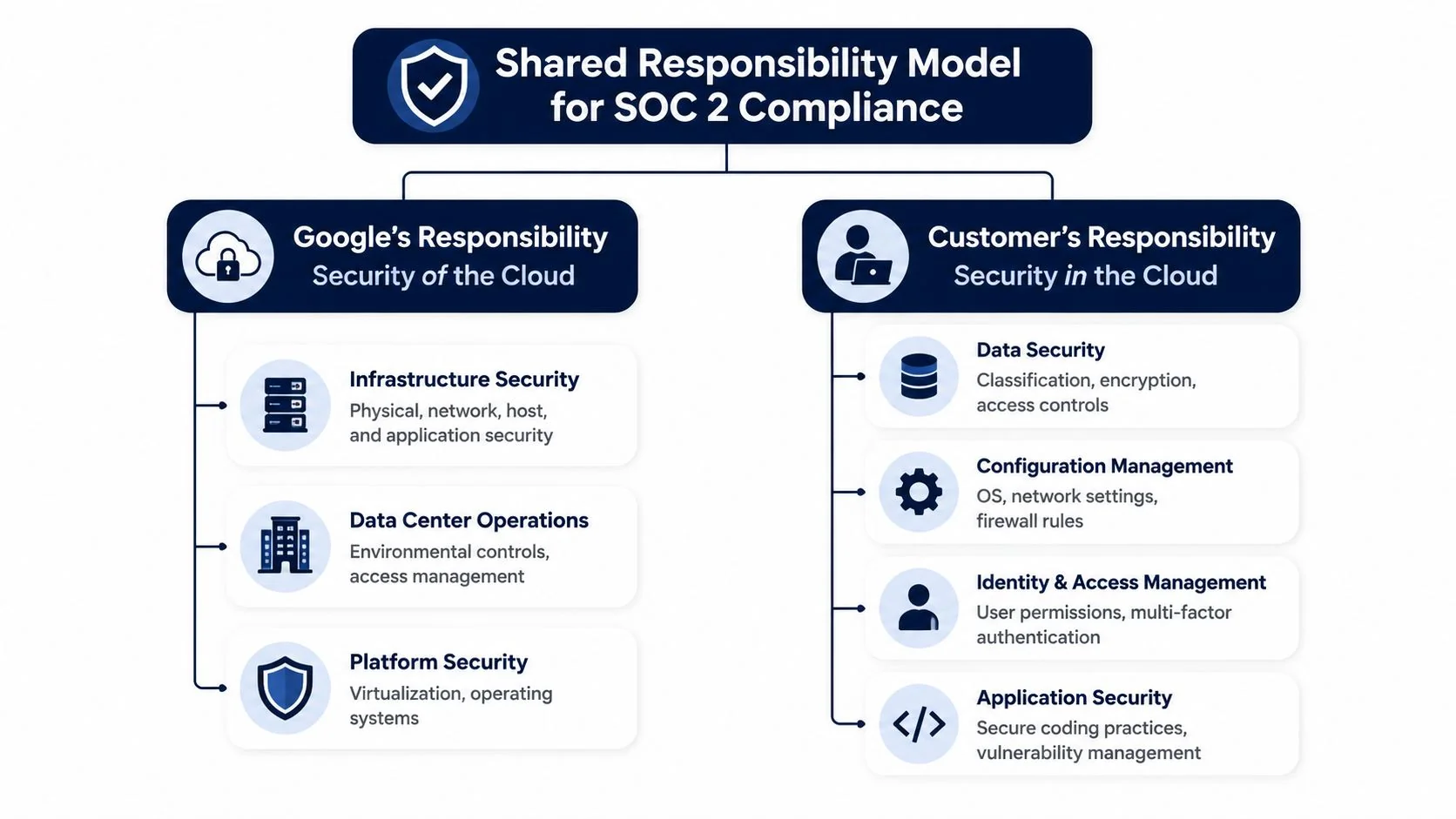
Google’s SOC 2 report supports reliance on controls at the provider layer. Your own audit evidence still has to cover how your team configured and operates GCP inside your tenant.
What Google’s report actually helps you prove
The report is useful for controls tied to Google’s operation of the underlying environment. In practice, that usually means physical security at data centers, environmental safeguards, host and platform administration, parts of logical security for the managed infrastructure, change management over the services Google runs, and incident response processes at the provider layer.
It also gives your auditor a basis to place reliance on tested controls for the Trust Services Categories covered in the report, rather than asking your team to produce evidence for activities you do not perform.
That distinction matters during fieldwork. A good auditor will not ask your team for server cage access logs from a Google facility. They will ask for the provider attestation that covers that control.
What the report does not cover for you
The report does not prove that your GCP environment is configured appropriately for your SOC 2 scope. Auditors still need customer-side evidence for the controls you own.
That usually includes:
- IAM setup and governance. Role design, privileged access, joiner mover leaver handling, service account controls, and periodic access review.
- Logging and alerting choices. Which events are captured, retention settings, alert thresholds, and evidence that reviews happened.
- Network architecture. Firewall rules, ingress restrictions, segmentation decisions, private connectivity, and administrative path controls.
- Encryption implementation. Default encryption use, customer-managed keys if applicable, key access restrictions, and key rotation procedures.
- Operational process execution. Change approvals, deployment controls, vulnerability handling, backup checks, and incident response records tied to your system.
Teams frequently lose time. They submit Google’s report and assume it covers IAM, logging, or network restrictions in their own project. It does not. The report may describe control objectives around the platform. It does not attest that your administrators avoided broad roles, enabled the right audit logs, or restricted public exposure on specific services.
The practical boundary auditors care about
For SOC 2, the clean boundary is not “Google secures the cloud, we secure what we build on it.” Auditors want that translated into evidence by control.
A usable approach is to map each relevant criterion to one of three buckets: inherited, shared, or customer-managed. Then attach the evidence source. For inherited items, cite Google’s report. For shared items, pair the provider report with your configuration evidence. For customer-managed items, rely on your own policies, settings, tickets, screenshots, exports, and review records.
Bridge periods matter too. If your audit window extends beyond the provider report period, your auditor may ask for a bridge letter to confirm continued operation of the covered controls. SOC2Auditors’ bridge letter insights explain why that date alignment matters.
The mistake to avoid is treating the provider report as a blanket pass for every control that touches GCP. It is one piece of the evidence stack. The useful work is in drawing the line correctly, then proving your side of it with tenant-specific evidence.
How to Access the Correct Report and Bridge Letter
Your auditor asks for infrastructure control support on Tuesday. Fieldwork starts on Thursday. Someone on your team pulls a Google Cloud SOC 2 PDF, drops it in the evidence folder, and assumes the request is covered. Then the auditor checks the report period, asks whether the services you use are in scope, and requests a bridge letter for the gap. That is where teams lose time.
Start with the report type
For audit support, you want the current Google Cloud SOC 2 Type II report for the services your environment uses. Type II reports are the ones auditors expect to see because they address control operation over a period, not just control design at a point in time.
That does not mean any Google report will work. Check the report title, covered services, report period, and any scope notes before you save it to your audit repository. I see teams waste review cycles by pulling the wrong report family or by assuming all GCP services they use fall under the same scope language.
Get both documents
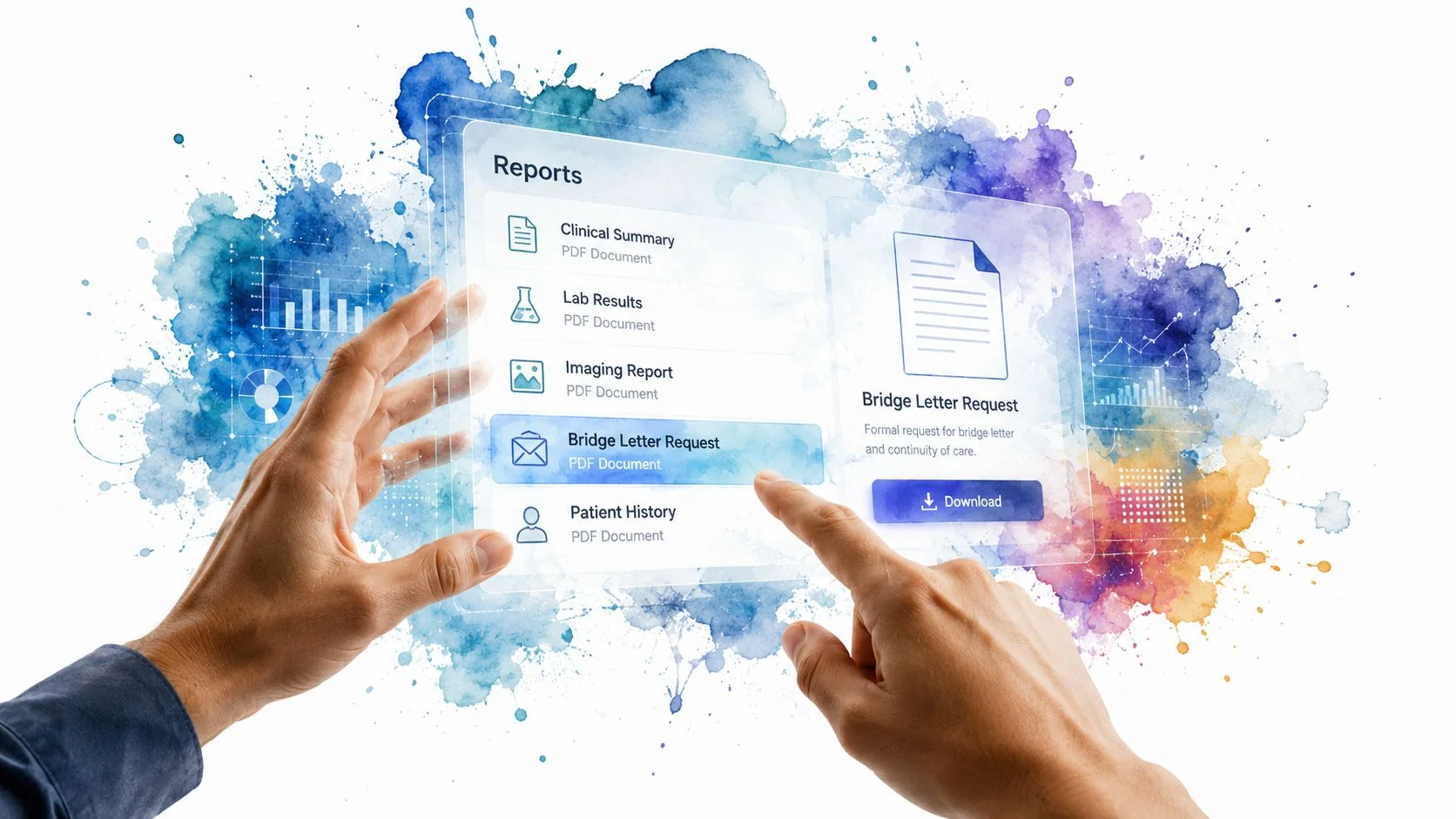
The main report is only part of the package. If the report end date does not reach your audit testing date, your customer review date, or the end of your control period, get the bridge letter too.
This is usually a portal process problem, not a technical one. The person downloading the files needs to confirm they selected the current report version and the bridge letter for the exact gap period. SOC2Auditors’ bridge letter insights give a practical explanation of why auditors ask for this and what the letter is meant to cover.
Use a simple review sequence before you send anything to your auditor:
- Confirm portal access and acceptance terms so the audit team can retrieve documents without last-minute delays.
- Download the current SOC 2 Type II report for the Google Cloud services relevant to your environment.
- Read the period covered and compare it to your own audit window.
- Get the current bridge letter if there is any date gap.
- Save both documents with version dates in your evidence repository and restrict access to the audit team.
What auditors check first
Auditors usually spot the same three issues right away.
- Scope mismatch. Your team relies on GCP services that are not clearly covered by the report you provided.
- Date mismatch. The report period ends too early, and there is no bridge letter.
- No control cross-reference. The report is attached as a raw artifact with no note showing which of your controls inherit support from it.
The fix is straightforward. Download the right report. Match the dates. Add a short internal memo or control matrix that states which controls cite the provider report and where your own configuration evidence fills the gap.
That turns the Google Cloud report from a generic attachment into usable audit evidence.
Mapping GCP Controls to SOC 2 Trust Services Criteria
The provider report becomes valuable only when you map it into your own control set. Auditors don’t want a folder full of cloud artifacts with no explanation. They want to see how inherited controls and customer-operated controls work together under the Trust Services Criteria.
The most practical criteria for many SaaS companies on GCP are Security, Availability, and Confidentiality. Depending on your product and commitments, Processing Integrity and Privacy may also matter, but they often require more application-specific evidence than infrastructure evidence alone can provide.
A useful way to map inherited and customer controls
For SOC 2, think in two layers:
- Inherited layer from Google. Platform, facility, and managed service controls supported by the provider report.
- Configured layer from you. IAM, logging, network policy, encryption choices, release controls, and operational procedures.
That structure helps with several AICPA Trust Services Criteria. Under Security, auditors often examine logical access and system operations. Under Availability, they want to see whether the architecture and operating procedures support uptime commitments. Under Confidentiality, they look for controls that protect sensitive information through restriction and encryption.
| Trust Service Criterion | GCP Service / Feature to Demonstrate Compliance | Why It Matters for Your Audit |
|---|---|---|
| Security | IAM, Cloud Audit Logs, org-level policy settings | Supports your evidence for logical access, access governance, and detection of administrative activity |
| Security | Shared provider controls from the Google Cloud SOC 2 report | Addresses inherited infrastructure controls you don’t operate directly |
| Availability | Regional or multi-zone architecture choices, backup settings, monitoring and alerting configurations | Shows your company designed and operates the environment for resilience, not just that Google runs available infrastructure |
| Availability | Managed services covered in the provider report | Supports the underlying platform assurance your service depends on |
| Confidentiality | Encryption settings, KMS or customer-managed key usage where applicable, restricted access patterns | Demonstrates that confidential data is protected within your tenant and under your control model |
| Processing Integrity | Change controls, release approvals, deployment governance, logging around production changes | Helps show that system processing remains complete, valid, accurate, timely, and authorized |
| Privacy | Data handling controls, access restrictions, retention practices, privacy procedures where applicable | Required when your scoped commitments include personal information handling under privacy criteria |
What auditors expect to see by criterion
Security
Security usually creates the most work because that’s where the shared responsibility line is easiest to blur. Google can attest to the security of the underlying cloud. You still need to show who can administer your projects, how access is approved, how privileged activity is logged, and how security events are detected.
A clean evidence package for Security usually includes your IAM model, audit logging configuration, access review records, and incident response tie-ins. If you rely on service accounts, be ready to explain how those identities are controlled and reviewed.
Audit lens: The provider report answers “Is the cloud platform controlled?” Your evidence answers “Is your use of it controlled?”
Availability
Availability is where architecture choices matter. Auditors don’t give credit for cloud branding. They look for deliberate design and operating practices. If your system depends on a single fragile deployment path, the fact that Google operates reliable infrastructure won’t carry your control narrative.
Show the operational decisions your team made. Redundancy choices, backup governance, alert routing, and recovery procedures are usually more persuasive than a high-level architecture diagram by itself.
Confidentiality
Confidentiality controls often break down around broad access and weak key management practices. If you store customer data in GCP, your auditor will want to know how that data is restricted and protected in your tenant. The provider report helps with inherited platform protections, but not with your decisions about access scope, logging, or encryption configuration.
Build a control narrative, not a feature dump
One common mistake is handing auditors a spreadsheet of GCP services with no relation to control objectives. A better approach is to write short narratives tied to specific criteria.
For example:
- For logical access under Security, note that Google covers inherited infrastructure controls while your company enforces IAM role assignment, approval, and review within projects.
- For system operations, connect provider-layer monitoring and resilience to your own logging, alert triage, and incident procedures.
- For change management, identify the production deployment path and show where approvals and evidence are retained.
That narrative is what turns the Google Cloud SOC 2 report into something your auditor can rely on.
Using the Report for Vendor Risk and Building Client Trust
Your sales team is closing a security review. The prospect asks two predictable questions. What controls does Google cover, and what do you still operate yourself?
That is where teams either look prepared or create extra work for everyone. If the only answer is “we run on GCP,” the customer learns almost nothing. A better answer shows that your team reviewed Google’s assurance documents, identified the controls you inherit, and documented the controls you still configure and test in your own environment.
Review it like a vendor risk analyst
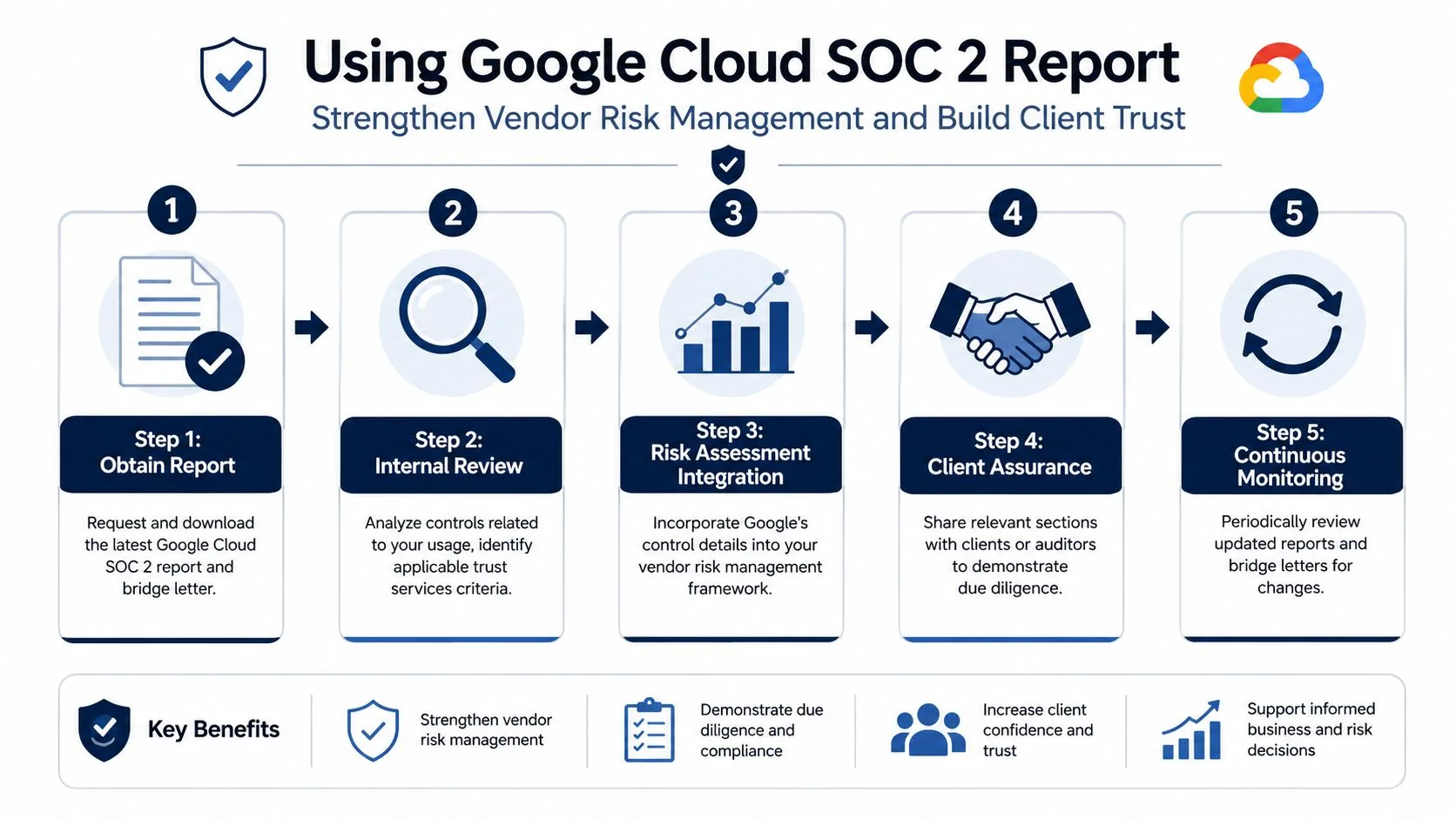
Treat the Google Cloud SOC 2 report as an active vendor risk record, not a file you download once for procurement and forget. Auditors and customer security teams both want to see that someone on your side read it and assessed whether it fits your use of GCP.
Review these points and record the result:
- Audit period. Confirm the report period supports the time frame you need for diligence or audit reliance.
- Scope of services. Check that the GCP services in your architecture are covered, or note where they are not.
- Auditor opinion. Read the opinion section for qualifications, carve-outs, and subservice treatment.
- Exceptions or deviations. Determine whether any finding affects a control your company inherits.
- Complementary user entity controls. Pull out the customer responsibilities that apply to your configuration and operations.
The practical mistake here is skipping the write-up. If your vendor review says only “Google has SOC 2,” you have not shown much judgment. A defensible review states what you use, what the report covers, what period it covers, and what your team must still do in GCP. That record helps during preparing for your SOC 2 audit and during customer diligence because the same questions come up in both places.
Use it in customer diligence without overselling it
Customers do not need a long cloud theory lesson. They need a clean package that answers responsibility boundaries fast.
A practical response usually includes:
- Your own SOC 2 report or readiness materials, if available
- Google’s SOC 2 report
- The current bridge letter
- A short shared responsibility matrix
That package builds trust because it shows two things at once. You performed vendor diligence on a critical provider. You also understand that provider assurance does not cover your IAM model, logging choices, backup settings, network restrictions, or change process inside your GCP tenant.
Keep the explanation plain:
“We use Google for inherited infrastructure controls, and we separately evidence the controls we configure and operate in our own GCP environment.”
That statement works because it is specific and supportable. It also avoids a common mistake. Teams often oversell the provider report as if it covers their full production stack. Customer security reviewers catch that quickly, and once they do, the questionnaire usually gets longer, not shorter.
How to Present GCP Evidence to Your Auditor
The final evidence package should be simple to understand. Your auditor shouldn’t have to reverse-engineer your cloud setup from screenshots and policy PDFs. They need a coherent package that separates inherited controls from customer-operated controls and ties both back to the criteria in scope.
What belongs in the evidence packet
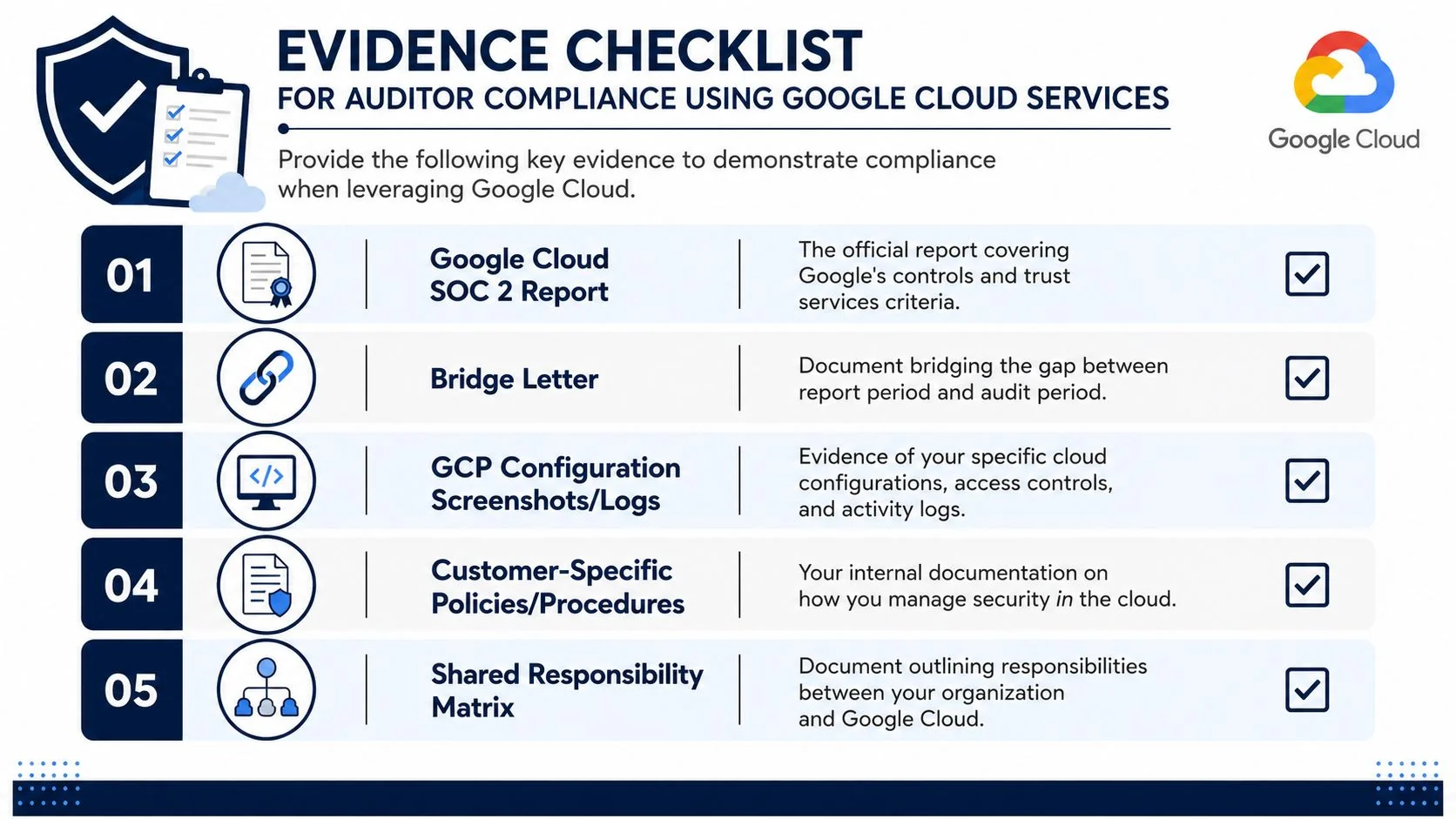
A strong submission usually includes these items:
- Provider assurance documents. The Google Cloud SOC 2 report and the current bridge letter.
- Your responsibility matrix. A concise mapping of inherited versus customer controls.
- GCP configuration evidence. Screenshots, exports, or logs showing how your environment is configured.
- Policy and procedure support. Access control, change management, incident response, and logging policies tied to your actual cloud practices.
- Change evidence. Tickets, approvals, merge reviews, or infrastructure-as-code history demonstrating controlled changes.
For SOC 2, this matters because auditors test implementation, not intent. A policy that says access is restricted isn’t enough if your GCP evidence doesn’t support it.
The technical fixes that often make the difference
A critical underserved angle is the specific technical remediation required when Google Cloud Project configurations fail against SOC 2 automation tools like Drata, a gap often missed by generic audit guides that focus on policy rather than infrastructure, as described in this analysis of Drata GCP control failures.
In practice, several control areas come up repeatedly:
- Service account hygiene. Auditors often want proof that service account use is controlled and that static keys aren’t lingering where they shouldn’t be.
- Data Access logging. Basic logs aren’t always enough. If your scope requires meaningful auditability, be ready to show that Data Access logs are enabled at the organization level where appropriate.
- Encryption evidence. If you state that sensitive data is protected with stronger key control, you need to show the actual CMEK configuration and governance, not just a policy statement.
- Change management artifacts. For controls like CC8.1, Terraform or other infrastructure-as-code configurations can serve as persuasive evidence when paired with approvals, reviews, and deployment records.
- Binary Authorization or release controls. If your environment uses deployment guardrails, include that evidence where it supports your change management story.
How to make the auditor’s job easy
Present evidence in the order the auditor thinks:
- Start with the control objective. Example: logical access, logging, encryption, or change management.
- State ownership. Google, your company, or shared.
- Attach the relevant provider artifact if inheritance applies.
- Attach your tenant-specific evidence from GCP.
- Add one sentence of narrative explaining how the evidence supports the control.
That structure works better than dumping exports into a folder called “cloud evidence.”
A clean audit package answers three questions immediately: who owns the control, what evidence supports it, and whether that evidence covers the audit period.
If you’re still organizing this for the first time, it’s worth reviewing guidance on preparing for your SOC 2 audit before fieldwork starts.
The companies that move through SOC 2 fieldwork faster usually aren’t the ones with the fanciest cloud stack. They’re the ones that present the Google Cloud SOC 2 report, the right bridge letter, a clear control mapping, and tenant-level GCP evidence that matches what their policies claim. That’s what audit readiness looks like in practice. It shows that your team understands the shared responsibility model and can prove both inherited and customer-operated controls in a way an auditor can test.
If you’re selecting an auditor and want to compare firms by industry fit, budget, and timeline, SOC2Auditors helps teams evaluate options with verified data and appropriate matches.
More in Audit Preparation