 Menu
Menu

On this page
A spam mail blocker is part of the control environment, not just an inbox cleanup tool. For SOC 2, email filtering has to do more than stop junk. It has to reduce a known attack path, enforce policy, and produce evidence an auditor can test.
Spam still represents a large share of global email traffic, and attackers continue to use email for credential theft, malware delivery, business email compromise, and data exfiltration attempts. That volume changes the design standard. A basic filter with default settings is rarely enough if the goal is to satisfy SOC 2 Security criteria such as CC6.1, CC6.7, CC6.8, and CC7.2.
I usually treat the mail gateway as a monitored control boundary. If the organization claims it restricts unauthorized access, detects security events, and protects confidential information, email has to be covered in that control story. Auditors will ask who owns the configuration, how tuning changes are approved, what gets quarantined versus rejected, how false positives are reviewed, and what evidence shows the control operated over the audit period.
That is the standard this guide uses. Every architectural choice, policy setting, and monitoring step is tied back to SOC 2 design, operation, and evidence.
Defining the Spam Mail Blocker for Compliance
A spam mail blocker is a control layer that evaluates inbound and outbound email using sender authentication, reputation analysis, message content inspection, attachment scanning, URL analysis, and policy enforcement. Its job is simple in principle. Accept legitimate mail. Quarantine suspicious mail. Reject clearly malicious or unauthorized mail.
From a SOC 2 perspective, that maps directly to the Security and Confidentiality categories. A spam mail blocker supports CC6.8 by helping prevent or detect unauthorized system components or unauthorized communications entering the environment. It supports CC7.1 by giving the organization detection and monitoring procedures over a channel attackers use constantly. If finance receives spoofed payment requests, if HR opens credential-harvesting links, or if support forwards malware internally, your email layer has already failed as a control boundary.
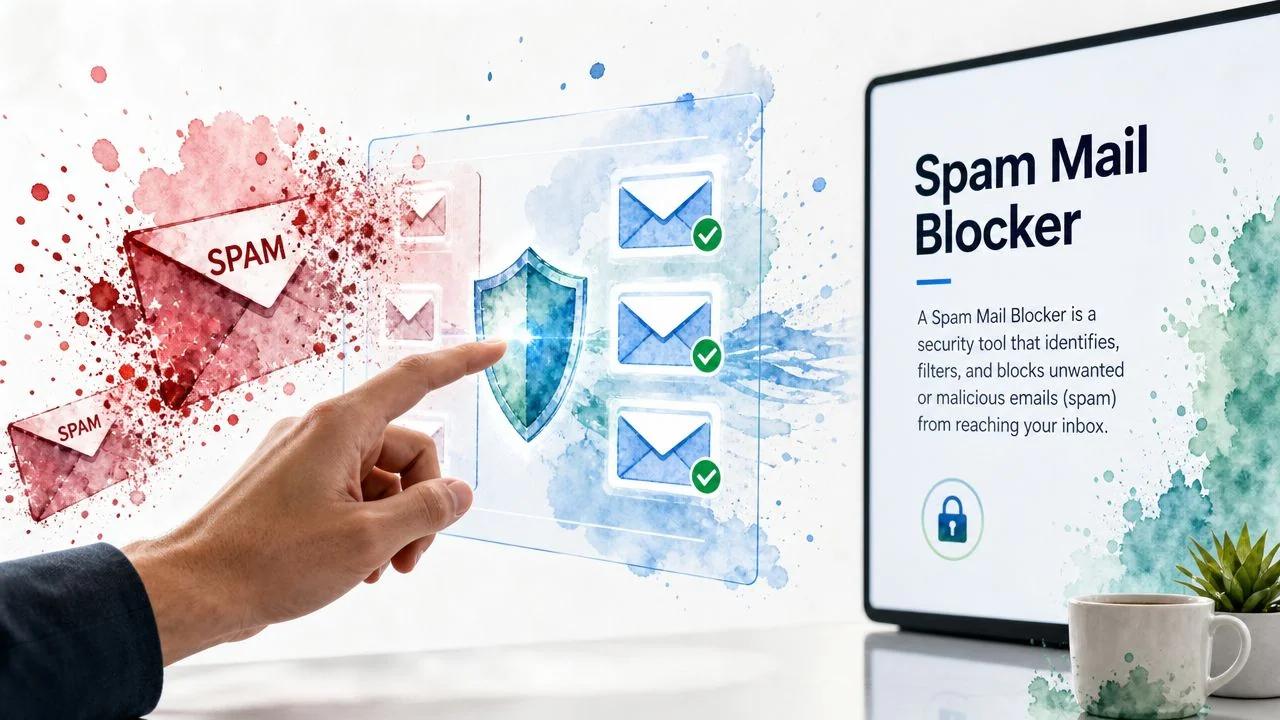
This visual captures the operational purpose of the control:
Why auditors care
Auditors usually won’t treat spam filtering as a standalone checkbox. They’ll test it as part of a broader control system. They’ll ask whether your email protections are designed, whether they’re implemented consistently, and whether someone reviews the output. A tool that exists but isn’t configured, monitored, or tied to documented procedures won’t carry much audit weight.
For SOC 2, a usable spam mail blocker should produce evidence in at least these areas:
- Policy evidence. Your security policy, acceptable use policy, or messaging security standard should define how the company handles malicious and unsolicited email.
- Configuration evidence. Auditors will expect screenshots, admin exports, policy settings, and DNS records showing what’s enforced.
- Monitoring evidence. Someone needs to review quarantine events, sender failures, or alerting output.
- Incident evidence. When the filter misses a message or blocks a legitimate one, your team needs a documented response path.
Practical rule: If your spam mail blocker can’t produce logs, policy history, and administrative evidence, it’s weak for SOC 2 even if it blocks mail well.
Founders often think of email security as a user-awareness issue. Auditors don’t. They look at email as an entry point into systems that store customer data, financial records, and internal credentials. A spam mail blocker matters because it’s one of the clearest examples of a preventive and detective control working together. If you can’t show control over email, it’s harder to prove control over the rest of the environment.
Selecting Your Spam Blocking Architecture
Architecture matters because auditors test not only whether a control exists, but whether it’s manageable, reviewable, and appropriate for your environment. Organizations often adopt one of three models. A dedicated email gateway, a cloud-native security stack tied to Microsoft 365 or Google Workspace, or endpoint-centric filtering that relies heavily on local mail client and device controls.
The wrong choice usually doesn’t fail an audit by itself. What causes trouble is choosing a model that your team can’t administer consistently or can’t extract evidence from when the auditor asks for it.
Architecture comparison
| Architecture | SOC 2 Advantage | Management Overhead | Best For |
|---|---|---|---|
| Email gateway | Centralized policy enforcement, strong quarantine control, easier log review, clearer evidence set for auditors | Moderate to high | Companies with mixed mail flows, multiple domains, or stricter compliance expectations |
| Cloud-native security | Deep integration with Microsoft 365 or Google Workspace, simpler identity alignment, native admin logs | Low to moderate | SaaS teams already standardized on one productivity suite |
| Endpoint protection | Adds user-device protection and client-level inspection where mail reaches the endpoint | Moderate | Organizations that need an extra layer for attachments, URLs, and local execution risks |
Gateway model
A gateway sits in front of the mailbox platform and inspects mail before delivery. From a compliance standpoint, this is often the easiest architecture to defend. Policies live in one place. Quarantine actions are centralized. Admin activity is easier to review. If you need to prove that attachment sandboxing or sender reputation rules are active, the gateway usually gives you direct evidence.
The downside is operational overhead. Someone must own mail flow, policy tuning, vendor administration, and escalation handling. For small teams, that ownership gap is where control quality degrades.
Cloud-native model
Microsoft Defender for Office 365 and Google Workspace security controls are often the most practical path for startups. They inherit identity, tenant, and logging context from the platform users already live in. That helps with enforcement against impersonation and internal spoofing. It also reduces the number of vendors your team must govern.
The weakness is evidence fragmentation. Native controls can be excellent, but screenshots and reports often live across several admin panels. During a SOC 2 audit, that means your GRC and security teams need a clean evidence map before fieldwork starts.
Choose cloud-native controls if your environment is already standardized and your team can document exactly where each policy, log, and review artifact lives.
Endpoint-centric model
Endpoint tools are useful, but they shouldn’t be your primary spam blocking architecture for SOC 2. They can catch malicious behavior when a user interacts with an email payload, especially attachments or links. That’s valuable. It’s just later in the kill chain.
For compliance, endpoint-only approaches are harder to defend because they don’t show strong preventive control over the email channel itself. Auditors generally prefer to see email filtering happen before risky messages land in the user inbox, with endpoint controls acting as a second line.
What works for SOC 2
The strongest pattern is usually layered. Use a gateway or cloud-native mail security platform as the authoritative control plane. Add endpoint detection where attachments and links could still execute. Then tie both layers to your logging and incident response processes. That gives you better prevention, clearer evidence, and fewer arguments during testing.
Implementing Essential Email Authentication Protocols
A spam mail blocker fails a basic control objective if it cannot verify who is allowed to send mail from your domain. SPF, DKIM, and DMARC are not optional hardening steps in a SOC 2 environment. They are the technical controls that let you prevent spoofing, prove policy enforcement, and show auditors that inbound email decisions are tied to authenticated identity. As Konfirmity’s SOC 2 email security guidance explains, organizations pursuing SOC 2 should implement SPF, DKIM, and DMARC to protect message integrity and block spoofed mail.
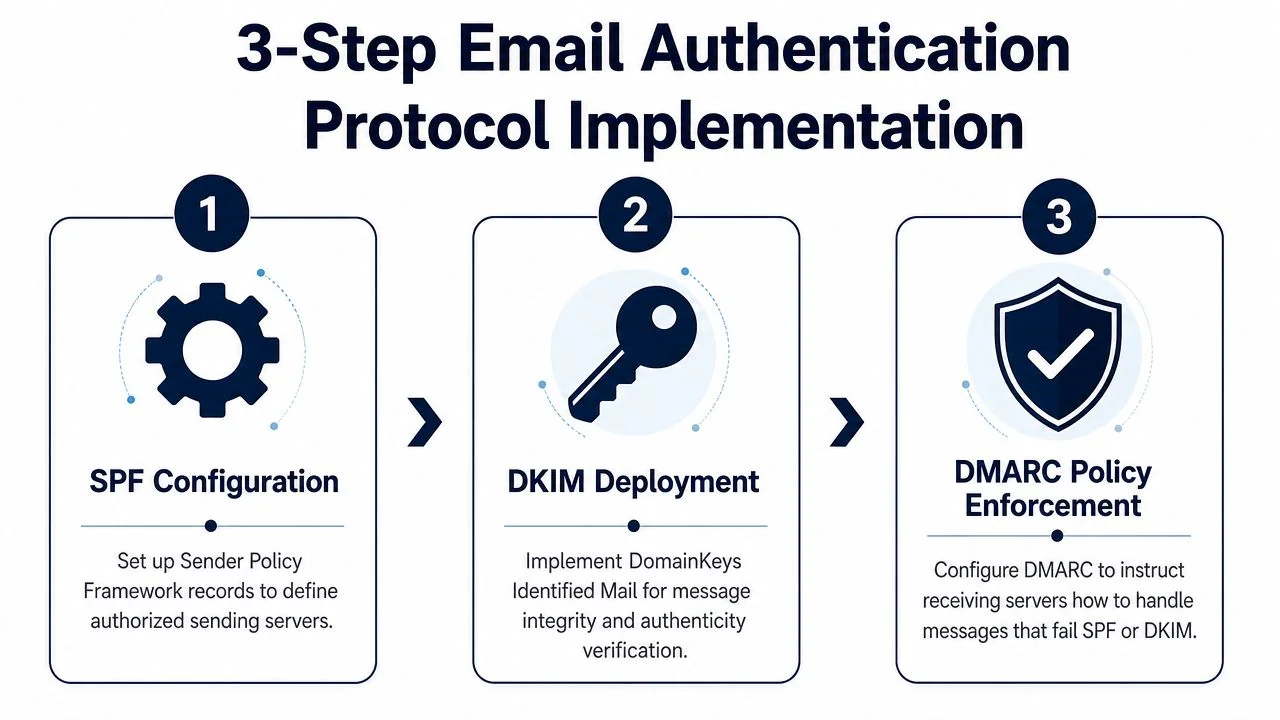
Here is the implementation sequence teams should follow:
Start with inventory, not enforcement
Publish a sending inventory before tightening policy. Include your mail platform, support system, CRM, billing stack, HR tools, product notifications, and any third-party service that sends customer or employee mail with your domain in the From header.
Auditors often compare your documented asset inventory and vendor list against the systems reflected in DNS and mail security settings. That makes sender mapping critical for SOC 2. If a business system sends mail but is missing from SPF, lacks DKIM signing, or fails DMARC alignment, the gap affects both security design and change management under the Trust Services Criteria, especially CC6 and CC8.
A practical sequence looks like this:
- Map authorized senders. Build a list of all services that send on behalf of your domains.
- Publish SPF. Authorize approved sending infrastructure only.
- Enable DKIM signing. Turn on cryptographic signing for each sending service that supports it.
- Add DMARC with
p=none. Use it to collect reports and identify misaligned senders before enforcement.
Phase DMARC deliberately
DMARC should move through documented stages. Start at p=none so you can review aggregate reports, identify unknown senders, and confirm alignment behavior across business systems. After cleanup, move to p=quarantine, then to p=reject once your approved senders are signing correctly and passing alignment consistently.
This phased approach does two jobs at once. It reduces the chance of blocking legitimate business mail, and it creates evidence that the control was implemented thoughtfully rather than switched on without validation.
- Observation phase. Review DMARC aggregate reports and reconcile unknown sources.
- Quarantine phase. Route failing messages to spam while validating operational impact.
- Reject phase. Refuse mail that fails authentication and alignment after the inventory is clean.
A DMARC record set to
p=noneis a monitoring state, not an enforceable anti-spoofing control.
What auditors usually ask for
SOC 2 testing rarely stops at “SPF, DKIM, and DMARC are enabled.” Auditors usually want proof that the settings are active, tied to a review process, and updated when new sending services are introduced. In practice, that means DNS records, admin console screenshots, sample DMARC reports, ticket history for mail-flow changes, and documented ownership for report review and exception handling.
The control mapping matters too. SPF, DKIM, and DMARC usually support CC6.1 and CC6.7 by restricting unauthorized transmission paths and reducing impersonation risk. If your team wants a broader framework view, this guide to implementing SOC 2 security controls is a useful reference.
Common implementation mistakes
Four issues cause repeated audit friction:
- Leaving DMARC at monitoring only.
p=nonegenerates visibility but does not block spoofed mail. - Missing third-party senders. Marketing platforms, help desks, and finance tools are frequent gaps.
- Treating authentication as a one-time setup. New vendors and product workflows change your mail path.
- Assigning no control owner. Someone needs to review reports, approve DNS changes, and document exceptions.
Authentication should feed policy decisions inside the spam mail blocker. Without that signal, filtering relies more heavily on content and reputation alone, which is weaker from both a security and audit standpoint.
Configuring Advanced Policies and Filtering Rules
Default settings are a starting point, not a mature control. Auditors want to see that your organization tuned the spam mail blocker around actual business risk. For most SaaS companies, that means rules for impersonation, malicious links, dangerous attachments, and targeted abuse against finance, HR, executives, and support teams.
Modern filtering engines also need to keep pace with evasion tactics. According to the peer-reviewed overview of machine learning in spam filtering, top-tier services layer AI-driven threat intelligence, real-time URL analysis, and double antivirus protection, pushing detection rates to 99.97% and reducing daily spam from 14 to 4 per employee, which cuts phishing exposure by 72%. For SOC 2 purposes, the takeaway isn’t to chase a marketing number. It’s to implement layered controls that are strong enough to show a risk-based design.
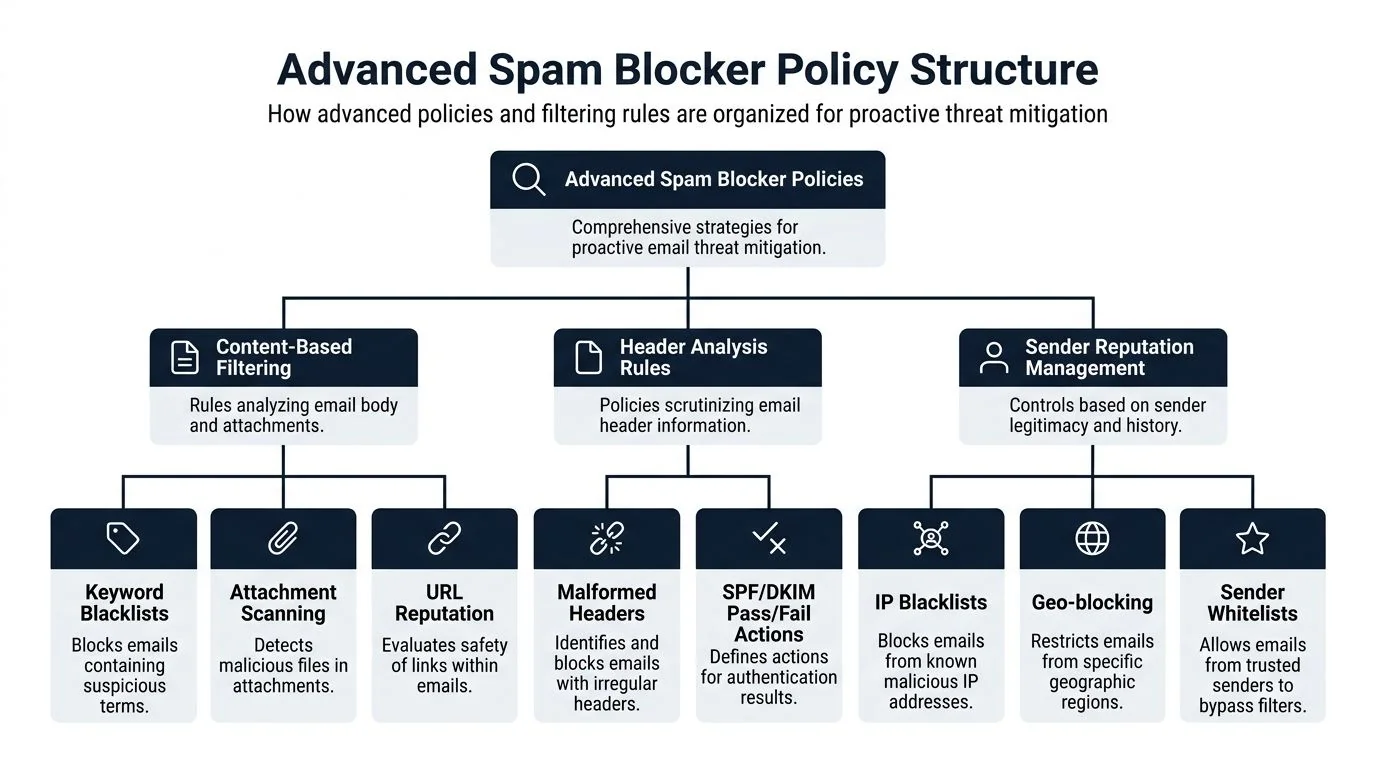
This policy hierarchy is what that maturity looks like in practice:
Policies worth enabling first
Not every advanced setting deserves the same priority. The most useful controls are the ones that close obvious attack paths and generate clear evidence.
- Attachment sandboxing. Detonate suspicious files before inbox delivery. This is especially important for Office documents, archives, and executable content delivered through disguised extensions.
- Time-of-click URL analysis. Scan links when the user clicks, not just when the email arrives. That addresses delayed weaponization.
- External sender tagging. Mark messages from outside the organization so users can spot impersonation attempts more easily.
- Display-name impersonation protection. Flag or quarantine messages that resemble executives, founders, finance approvers, or payroll contacts.
- BEC-focused policies. Create stricter handling for external emails containing payment, wire, invoice, tax, or bank-change language when they target finance or leadership.
Build role-based rules
A generic company-wide rule set is better than nothing, but SOC 2 reviewers generally respond well to controls that follow the organization’s actual risk assessment. If your risk register says finance is exposed to payment fraud and support is exposed to account takeover attempts, your filtering policies should reflect that.
A strong pattern is role-based segmentation:
| User group | High-risk scenario | Useful filtering policy |
|---|---|---|
| Finance | Invoice fraud, bank detail changes | Quarantine external messages with payment-change language and failed or suspicious authentication |
| HR | Credential theft, malware in resumes | Sandbox attachments and scrutinize file-sharing links from unknown senders |
| Executives | Display-name spoofing, BEC | Tight impersonation controls and VIP-specific alerts |
| Support | Account reset abuse, phishing links | URL rewriting, attachment scanning, and sender reputation checks |
If every inbox has the same policy set, your environment is probably easier to administer but harder to defend.
What doesn’t work well
Static blocklists alone don’t age well. They miss fast-moving domains and don’t capture intent. Broad attachment bans can also create business friction if they’re not tied to exception handling. The same goes for simplistic keyword filters. Attackers rewrite phrasing constantly, and users learn to ignore banners that fire too often.
A better design combines authentication outcomes, sender reputation, content analysis, attachment behavior, and user context. That combination matters for SOC 2 because it shows the control isn’t just “enabled.” It’s engineered around documented risk.
Managing False Positives and Monitoring Performance
A spam mail blocker that stops phishing but delays legitimate business mail is still a control problem. For SOC 2, that failure touches security and availability at the same time. Auditors will look for evidence that your team monitors outcomes, reviews exceptions, and adjusts the control when it interferes with business operations. That maps cleanly to CC4.1 for monitoring activities and often supports A1.2 when mail flow disruption affects service availability.
Tighter filtering always creates trade-offs. Strict RFC enforcement, aggressive spoofing controls, and broad attachment policies catch more bad mail, but they also increase the chance of quarantining messages from vendors, customers, or smaller partners with weak mail configurations. I have seen this show up most often during procurement, legal notice delivery, and invoice processing. If you cannot show how those exceptions are handled, the control looks brittle rather than well managed.
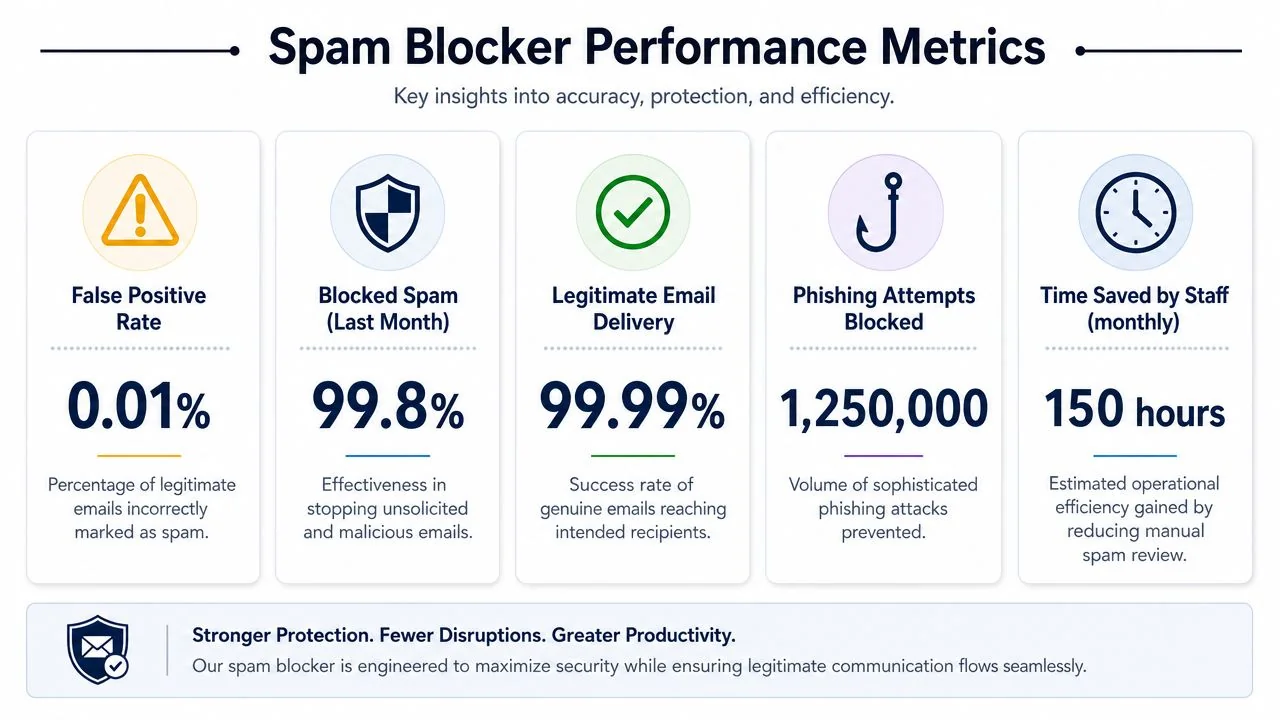
This kind of performance reporting should be operational, not decorative:
Set a review workflow
Users need a clear path to report blocked legitimate mail. Security and IT need a defined queue, named owners, and response targets. Without that, staff start asking senders to use personal email, alternate domains, or consumer file-sharing tools. That creates a larger compliance problem than the original spam issue.
A workable operating model usually includes:
- User submission path. Provide a documented method to report missed spam and false positives, ideally from the mail client or service portal.
- Tiered review. Let help desk or security operations handle routine quarantine review, but require escalation for allowlist changes, policy exceptions, or executive inbox releases.
- Approval records. Log who released the message, why it was released, and whether the decision led to a rule change or sender exception.
- Trend review. Review recurring false positives by sender, domain, attachment type, mail gateway action, and affected business process.
Those records become audit evidence. They show the control is operating, not just configured.
Monitor what matters
Track metrics that support a control narrative an auditor can test. Quarantine volume by policy category, user-reported false positives, user-reported missed phishing, mean time to review, mean time to release, repeat offenders by sender domain, and exception volume by department are all useful. So are changes in release rates after a policy update. If a new impersonation rule cuts spoofing attempts but doubles finance false positives, that is a signal to tune, not a sign to declare success.
Framing monitoring as an auditable activity, not just an admin task, is key to helping you understand SOC 2 compliance.
Keep the evidence set simple and defensible. Monthly review notes, quarantine logs, ticket records, exception approvals, and screenshots of policy revisions usually carry more audit value than a crowded dashboard no one reviews.
Auditors routinely ask whether control owners review outputs, whether exceptions follow a defined procedure, and whether tuning decisions are documented. A clean answer includes meeting cadence, sample tickets, quarantine review logs, and evidence that recurring issues led to configuration changes. That supports CC3.2 for control performance accountability and CC4.1 for ongoing monitoring.
This is also where security operations and certification readiness meet. Teams preparing for broader assurance work often align mail-control evidence with their wider certification program so logging, exception handling, and ownership models stay consistent across controls.
Review evidence that shows decisions, ownership, and follow-up. Auditors do not need proof that the tool exists. They need proof that the control works and is governed.
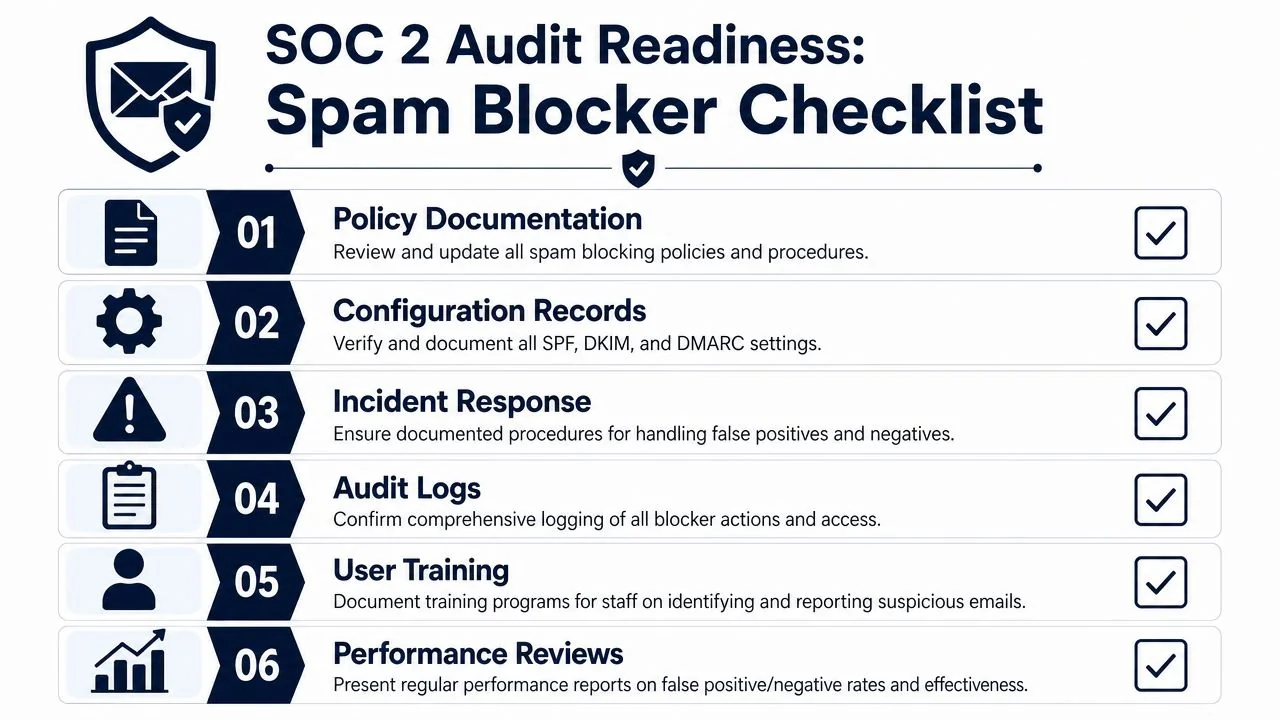
Your Spam Mail Blocker SOC 2 Audit Checklist
A spam mail blocker is not audit-ready because it catches junk mail. It is audit-ready when you can show policy, technical enforcement, review cadence, exception handling, and retained evidence that maps cleanly to SOC 2. Often, the relevant criteria are CC6.1 and CC6.7 for logical access and system protections, CC7.2 and CC7.3 for monitoring and anomaly response, and CC3.2 and CC4.1 for control accountability and ongoing evaluation.
Auditors test operation, not intent. If the mail gateway is configured well but nobody reviews quarantines, approves exceptions, or documents tuning decisions, the control will look weak under fieldwork.
This checklist is the version I’d want in the audit room before sample requests start.
Core evidence to prepare
- Security policy artifacts. Provide the email security policy, acceptable use policy, and incident response procedures that define how spam, phishing, spoofing, and quarantine handling are managed.
- System ownership records. Show who administers the spam mail blocker, who reviews alerts, and who approves policy exceptions.
- Configuration exports or screenshots. Capture anti-spam policies, impersonation settings, URL analysis settings, attachment controls, quarantine actions, and admin role assignments.
- Authentication evidence. Include screenshots or exports showing SPF, DKIM, and DMARC are active, plus records of ongoing review for DMARC reporting and sender alignment.
- Change management records. Tie major email security changes to tickets, approvals, and testing notes.
- Logging and review evidence. Provide examples of quarantine review logs, admin actions, policy edits, and recurring monitoring reports.
- Incident examples. If the organization had a phishing attempt, spoofing incident, or false-positive escalation, prepare the ticket trail and remediation notes.
Questions auditors are likely to ask
The questions are usually simple. The evidence behind them is what determines whether the control appears mature.
| Auditor question | What you should be ready to show |
|---|---|
| How do you prevent spoofed email from using your domain? | Authentication records, policy screenshots, and review evidence |
| How do you know the spam mail blocker is working? | Monitoring reports, quarantine review procedures, and tuning records |
| What happens when a legitimate message is blocked? | Documented false-positive process, tickets, approvals, and release logs |
| How do you control admin access? | Role-based access records and evidence of periodic review |
| How does this tie to risk assessment? | Risk register entries mapped to email threats and corresponding policies |
What separates a passable control from a strong one
A passable control has a tool deployed and default protections turned on. A strong control has named owners, documented review intervals, tested authentication alignment, controlled exception handling, and a record of policy changes tied to observed issues. That is the difference between a security product and a security control.
I also look for evidence quality. Screenshots without dates, ad hoc quarantine releases, and undocumented allowlist entries create audit friction. Ticketed changes, monthly review notes, and retained admin logs are far easier to defend.
Teams building the broader compliance program often align mail-control evidence with your broader certification program so ownership, review procedures, and change records follow the same model across control domains.
The best evidence is consistent evidence. Policy, configuration, logs, tickets, and ownership records should support the same narrative.
Final readiness check
Before the audit starts, confirm that your evidence package answers five practical questions:
- Is the control formally documented?
- Is the technical configuration enforced, not just planned?
- Can the team prove periodic monitoring and exception handling?
- Do security settings align with the company’s email-related risks?
- Can you produce artifacts quickly without reconstructing them during fieldwork?
A well-run spam mail blocker gives auditors a clear chain of evidence for preventive controls, detection activity, and protection of messages that may contain confidential information. For SOC 2, that directly supports testing of the Security criteria and, where email carries sensitive data, the Confidentiality criteria as well. The goal is not to prove that the tool exists. The goal is to prove that the control is configured, operating, reviewed, and governed.
More in Audit Preparation