 Menu
Menu

On this page
- What Is Active Directory and Why Auditors Care
- Mapping AD Functions to SOC 2 Principles
- Common AD Attack Vectors and Their SOC 2 Impact
- Core AD Hardening Controls for Audit Readiness
- Translating AD Controls to the Trust Service Criteria
- Securing Hybrid and Azure AD Environments
- Your Prioritized AD Remediation Roadmap
Active Directory is Microsoft’s directory service for Windows domain networks. It stores and manages identities, computers, groups, and policies, and it enforces authentication and authorization across systems connected to the domain. For a company pursuing SOC 2, Active Directory matters because it often sits at the center of logical access control, privileged administration, and audit evidence for how access is granted, reviewed, restricted, and monitored.
If you’re a startup CTO in the middle of enterprise sales, this usually becomes urgent when a prospect’s security team asks for your SOC 2 report and then starts drilling into identity controls. They want to know who can access production systems, how admins are separated from standard users, whether terminated users lose access promptly, and how you detect suspicious account activity. If your environment relies on Active Directory, or a hybrid of on premises AD and Microsoft Entra ID, the answers live there.
That’s why active directory and security can’t be treated as a back office IT topic. It’s a control system. It affects whether your team can support least privilege, prove access reviews happened, show that privileged actions are constrained, and satisfy an auditor that your security controls operate consistently instead of informally.
What Is Active Directory and Why Auditors Care
Active Directory is a directory service developed by Microsoft for Windows domain networks. It manages users, groups, computers, service accounts, organizational units, and policy enforcement. In practical terms, it decides who can sign in, what they can reach, what security settings apply to their device, and which administrative rights they inherit.
For a SaaS company, that becomes an audit issue quickly. A stalled enterprise deal often starts with a simple question from procurement or security: show us your access control environment. If engineering workstations, jump hosts, VPN access, file shares, Windows servers, or legacy applications depend on AD, auditors will treat it as a primary source of truth for access management.
The AICPA Trust Services Criteria put heavy weight on logical access controls, user provisioning, restriction of privileged access, and monitoring. Auditors don’t just want policy documents. They want system evidence that control statements are enforced in practice. In an AD-backed environment, that evidence often includes:
- User and group configuration showing role-based access assignments
- Group Policy settings showing baseline security enforcement
- Admin account separation showing privileged access controls
- Audit logs showing sign-in events, lockouts, changes, and administrative actions
A weak AD design creates a weak audit narrative. If every admin uses the same broad permissions, if dormant accounts remain active, or if service accounts are unmanaged, your SOC 2 story starts to fall apart.
AD is still relevant in modern architectures
Many teams assume Active Directory is only relevant for old Windows estates. That’s usually wrong. Plenty of modern SaaS companies still use AD for employee endpoints, internal apps, VPN, certificate services, or hybrid identity sync. Teams also use Composable DXP solutions using AD LDS when they need directory-backed application patterns without deploying a full domain dependency everywhere.
Practical rule: If AD controls who can access infrastructure, endpoints, or sensitive business systems, auditors will care even if your customer-facing app is fully cloud-native.
From a SOC 2 perspective, AD isn’t “legacy.” It’s part of the control environment that supports Security criteria such as CC6.1 and CC6.2, and it often influences whether your logical access controls look mature or improvised.
Mapping AD Functions to SOC 2 Principles
Auditors care about Active Directory because its core functions line up directly with SOC 2 control objectives. Authentication answers who the user is. Authorization answers what that user is allowed to do. Those are not abstract ideas in an audit. They’re operational controls that should be visible in systems, approvals, logs, and review records.
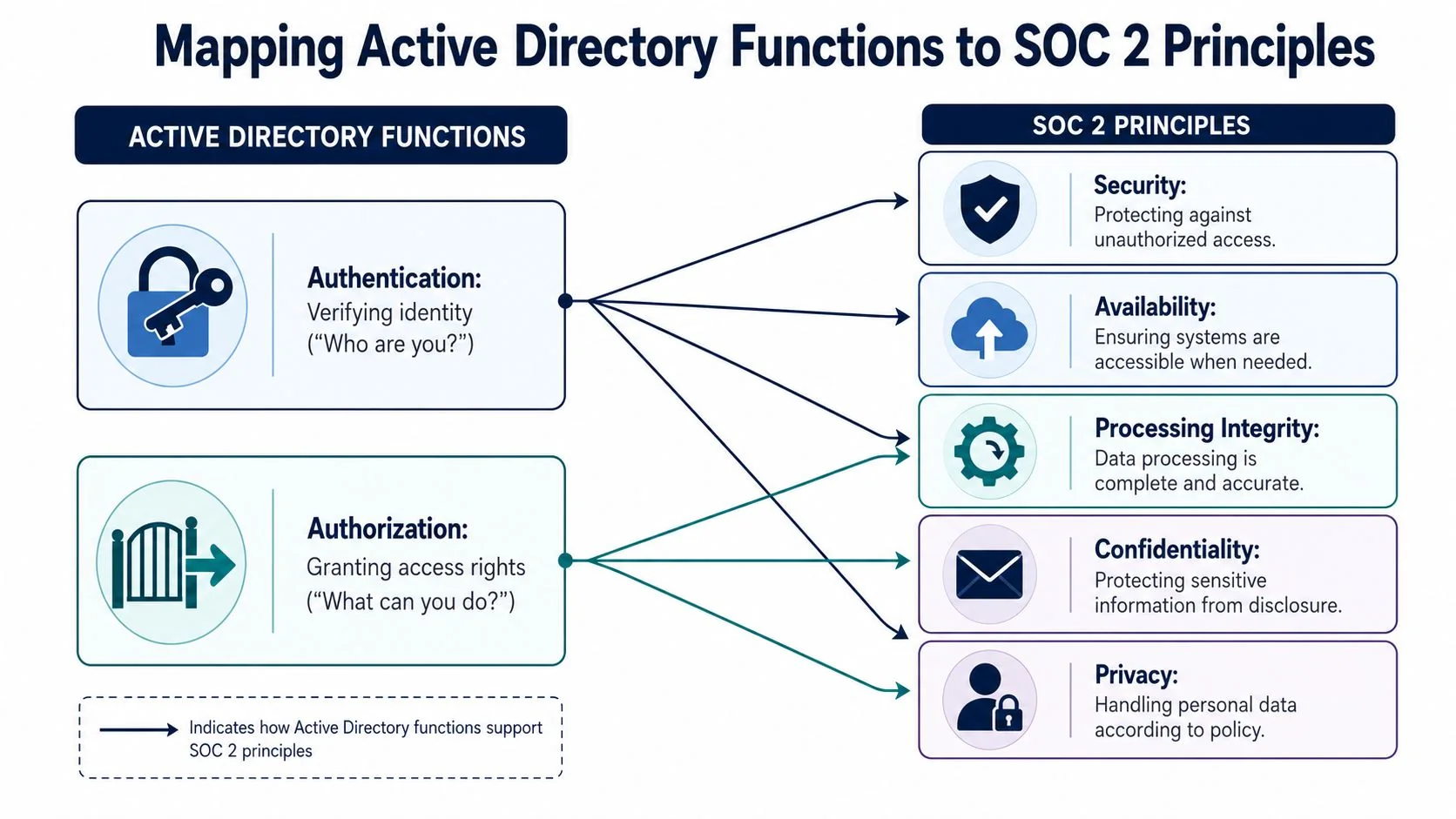
The core AD functions auditors examine
At the technical level, auditors usually start with a few concrete questions.
| AD Function | What it does in practice | Why it matters for SOC 2 |
|---|---|---|
| Authentication | Validates user identity at sign-in | Supports logical access control under CC6.1 |
| Authorization | Grants access through groups, ACLs, and delegated rights | Supports user access restriction under CC6.2 and CC6.3 |
| Policy enforcement | Applies security settings through GPOs | Shows controls are standardized, not ad hoc |
| Logging and change visibility | Records sign-ins, failures, account changes, and admin activity | Supports monitoring and investigation under CC7 criteria |
Where AD becomes audit evidence
A SOC 2 auditor isn’t impressed by “we usually remove access quickly” or “admins know what they should do.” They’re looking for repeatability. AD gives them a place to verify that repeatability if it’s configured well.
For example, AD objects and policies can demonstrate:
- CC6.1 Logical access security through centralized identity controls
- CC6.2 User access through joiner, mover, and leaver provisioning linked to group membership
- CC6.3 Authorization and modification through restricted administrative rights and approval-backed access changes
- CC6.6 Restriction of access through segmentation of privileged groups and sensitive systems
- CC7.2 Monitoring of system components and controls through log collection and review
Auditors trust systems more than intentions. Active Directory is one of the clearest places to prove that access policy is enforced consistently.
The practical translation
This is the shift many startups need to make. Don’t think of AD as just a Windows admin tool. Treat it as a compliance evidence generator. When configured correctly, it shows that access is provisioned through formal roles, privileges are constrained, and changes are visible.
When configured badly, it shows the opposite. Shared admin accounts, weak delegation, and missing logging tell an auditor that the company may have security policies on paper but not in operation. That directly raises risk for a SOC 2 engagement because the auditor may expand testing, request additional evidence, or identify exceptions tied to access governance.
Common AD Attack Vectors and Their SOC 2 Impact
Active Directory attacks matter for SOC 2 because they expose failures in control design and operation. An auditor may not test for every offensive technique by name, but they will assess whether your controls would reasonably prevent, detect, or contain those techniques.
One fact is worth grounding this discussion. According to the 2026 Verizon Data Breach Investigations Report, over 80% of hacking breaches involve compromised credentials, with Active Directory being the primary target for lateral movement within a network. For SOC 2, that means credential protection and privilege containment aren’t secondary controls. They’re central.
Kerberoasting
Kerberoasting targets service accounts that use service tickets protected by weak or crackable passwords. An attacker with domain access requests a service ticket, extracts the encrypted material, and attempts offline password cracking. If the service account is privileged, the blast radius grows quickly.
For SOC 2, this points to weak control over non-human identities and privileged credentials. It can support findings around:
- CC6.2 if service account assignment and ownership are unclear
- CC6.3 if privileged access isn’t appropriately authorized and restricted
- CC6.6 if sensitive systems are reachable through broadly privileged service accounts
Pass-the-Hash and Pass-the-Ticket
These attacks abuse captured authentication material rather than requiring the attacker to know the original password. If an attacker gets password hashes or Kerberos tickets from one compromised machine, they may reuse them to move across the environment.
That’s an audit problem because it shows the environment doesn’t adequately contain privileged authentication artifacts. In practice, this often reflects poor workstation hardening, weak admin separation, and excessive lateral access.
Audit lens: If admins log onto ordinary endpoints with high-privilege accounts, you’ve created an environment where a single endpoint compromise can undermine your logical access story.
Unsecured service accounts
Many AD environments still run critical services under old service accounts with static passwords, excessive permissions, and no clear owner. These accounts are often missed during quarterly access reviews because they aren’t tied to a normal employee lifecycle.
An auditor will see this as a governance failure, not just a technical one. That can affect CC6.2 for provisioning and modification, and CC7.2 if you can’t monitor anomalous use of those accounts.
Privilege escalation through group mismanagement
Sometimes the issue isn’t an exotic attack chain. It’s a nested group that implicitly grants broad rights, or an old delegated permission that nobody remembers creating. Attackers look for those paths because they don’t trigger the same attention as malware.
For SOC 2, this undermines the control objective behind least privilege. If access rights accumulate over time without review, your evidence for CC6.1, CC6.2, and CC6.3 weakens fast.
What doesn’t work is relying on annual cleanup or tribal knowledge. What works is reducing standing privilege, documenting privileged groups, reviewing effective access regularly, and logging every meaningful change to administrative membership.
Core AD Hardening Controls for Audit Readiness
Audit-ready Active Directory isn’t built from one control. It comes from a set of tightly run basics that leave evidence behind. Your goal is simple: make unauthorized access harder, make privileged actions rarer, and make every important change reviewable.
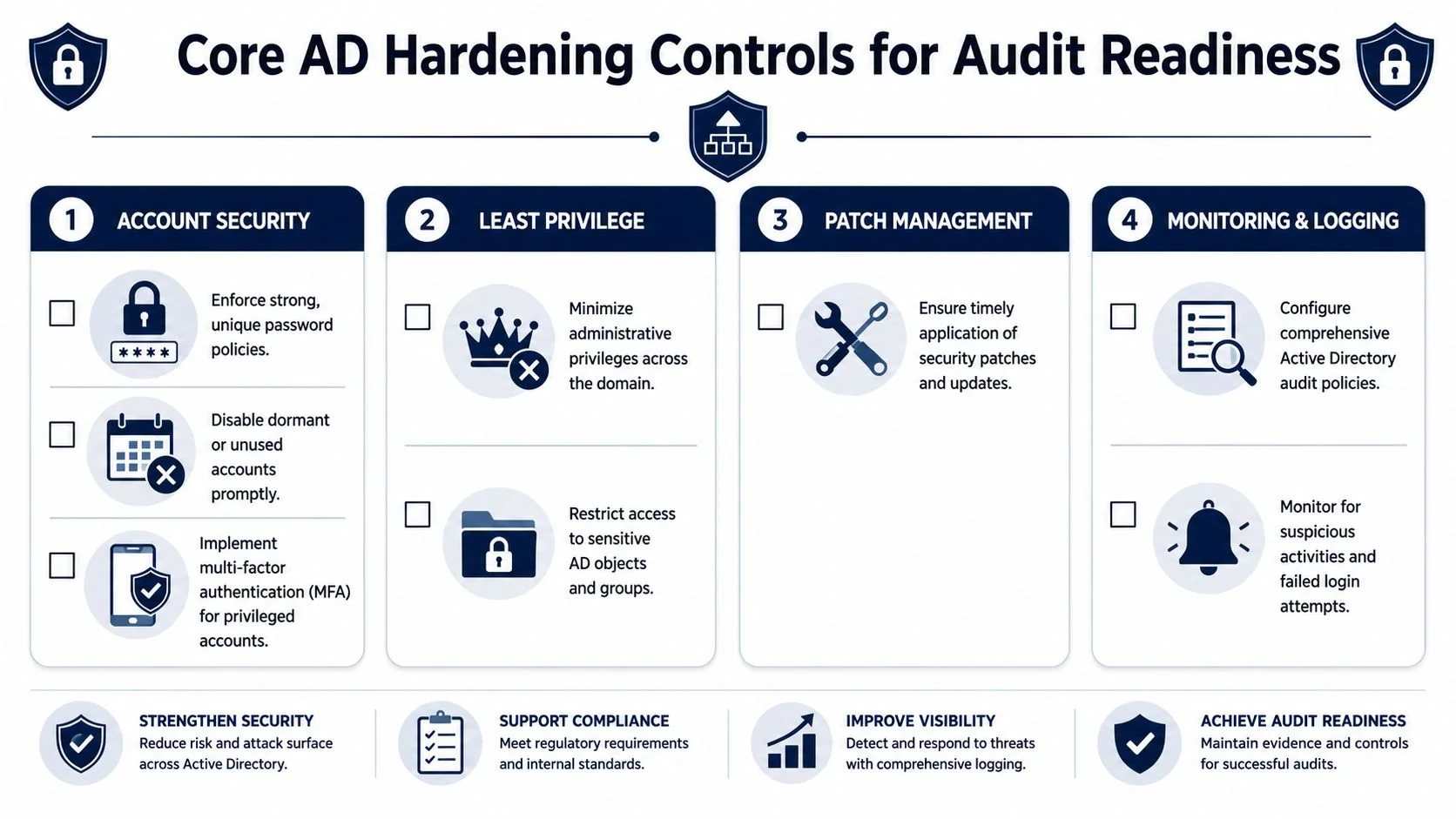
Enforce strong account hygiene
Start with account inventory. You can’t secure what you haven’t identified, and auditors will notice when dormant accounts, duplicate admins, and orphaned service identities remain enabled.
Focus on a short set of actions:
- Disable dormant accounts promptly so former users and abandoned test identities don’t remain valid entry points
- Separate standard and administrative accounts so admins don’t browse email or work from daily-driver sessions with administrative rights
- Document account owners for service accounts, shared operational accounts, and break-glass access
This produces visible evidence for access governance. Screenshots of disabled stale accounts, ticket-backed deprovisioning, and account ownership records all support the control narrative.
Use Group Policy like a control system
A lot of teams underuse GPOs. They configure a few password settings and stop there. That misses one of the strongest audit advantages in AD: centralized enforcement.
Use Group Policy to standardize:
- Password and lockout settings consistent with your written access control policy
- Interactive logon restrictions for privileged users
- Audit policy settings for account logon events, account management, privilege use, and policy changes
- Endpoint security baselines on domain-joined Windows systems
A GPO linked to the right organizational units is much stronger evidence than a manual checklist. It shows the company isn’t relying on individual admins to remember settings machine by machine.
Require MFA where it counts most
If remote access, privileged access, VPN, RDP, or cloud administration can happen without MFA, your audit position is weak. SOC 2 doesn’t prescribe one exact product, but the control expectation is clear. High-risk access should have stronger verification.
In practice, require MFA for:
- Privileged accounts
- Remote access paths
- Administrative access to cloud consoles and identity systems
- Any access path into production-supporting systems
Pair that with a written access control policy and evidence of technical enforcement. If you need a policy starting point, SOC2Auditors’ audit guidance is a useful reference for how auditors expect access controls to be documented.
Operator advice: MFA that excludes “temporary” admin workflows usually becomes permanent technical debt. Auditors notice exceptions that never closed.
Implement least privilege with tiered administration
Domain Admin should be rare. In mature environments, it’s rarely used for routine work. The better pattern is tiered administration. Separate domain-level administration, server administration, workstation administration, and application support where possible.
That means:
- Keep highly privileged groups small and named.
- Delegate narrowly instead of granting broad built-in rights.
- Use purpose-specific admin accounts.
- Review membership changes as controlled events.
This supports CC6.3 and CC6.6 because it restricts who can modify systems and how far one compromise can spread.
Replace fragile service account practices
Static service account passwords are a recurring weakness. Where supported, move services to Group Managed Service Accounts (gMSAs) so password rotation and management are handled more safely than with manually maintained credentials.
What works:
- Assign each service account a clear owner.
- Limit interactive logon.
- Limit scope to only the systems and services required.
- Review privileges the same way you review human admins.
What doesn’t work is creating one powerful service account per platform and leaving it untouched for years.
Turn logging into audit evidence
Hardening without monitoring leaves you blind. Configure AD-related logging so security and IT can answer basic questions quickly: who changed a privileged group, which account locked out repeatedly, what new account was created, and where a sensitive sign-in originated.
At minimum, collect and review logs for:
- Account creation, disablement, and deletion
- Privileged group membership changes
- Authentication failures and lockouts
- Policy and GPO modifications
- Sensitive administrative actions
If those logs are forwarded into Microsoft Sentinel, Splunk, or another SIEM, your evidence package becomes much stronger because you can show both collection and review.
Translating AD Controls to the Trust Service Criteria
A lot of SOC 2 friction comes from translation. Infrastructure teams know what they hardened. GRC teams know the Trust Services Criteria. Audit readiness improves when those two views are mapped directly.
Mapping Active Directory Controls to SOC 2 Criteria
| AD Hardening Control | Description | Primary SOC 2 Criteria Addressed |
|---|---|---|
| Centralized authentication through AD | Uses domain identity for sign-in control and consistent account governance | CC6.1 |
| Role-based group design | Assigns access through groups instead of direct user-by-user permissions | CC6.1, CC6.2 |
| Joiner, mover, leaver workflow tied to AD changes | Provisions, changes, and removes access through approved workflow | CC6.2 |
| Separate admin and standard user accounts | Limits privileged activity to dedicated administrative identities | CC6.3, CC6.6 |
| Tiered administration and delegated rights | Restricts broad domain-level permissions and narrows admin scope | CC6.3, CC6.6 |
| MFA for privileged and remote access | Strengthens access verification for high-risk sign-ins | CC6.1, CC6.3 |
| Group Managed Service Accounts | Reduces password management risk for service identities | CC6.2, CC6.3 |
| GPO-based workstation and server security baselines | Enforces consistent system security settings | CC5.2, CC6.1 |
| Audit logging for account and policy changes | Captures evidence of administrative and access-related events | CC6.7, CC7.2 |
| Review of privileged group membership | Verifies elevated access remains appropriate over time | CC6.2, CC6.3 |
| Restriction of local administrator access with LAPS or equivalent | Prevents password reuse and reduces lateral movement risk | CC6.3, CC6.6 |
| Formal incident response for suspicious identity activity | Escalates and investigates credential abuse indicators | CC7.2, CC7.3 |
How to use this mapping during an audit
This table is most useful when paired with your evidence list. For each control, keep three things ready:
- Policy evidence such as access control, privileged access, and logging standards
- Configuration evidence such as GPO exports, group membership snapshots, MFA enforcement settings, and service account configuration
- Operational evidence such as access reviews, ticket approvals, SIEM alerts, and remediation records
That combination is what auditors want. Policy alone doesn’t prove operation. Logs alone don’t prove intent. Configuration alone doesn’t prove governance.
The trade-off teams often miss
There’s a real tension between operational speed and clean control design. Startups often grant broad permissions because shipping is urgent. That works until a customer questionnaire, penetration test, or SOC 2 walkthrough exposes how much access has accumulated.
Your AD environment should tell the same story as your SOC 2 narrative. If the report says least privilege matters, your privileged groups should look like it.
The practical win is that AD hardening usually improves both security and audit clarity at the same time. A smaller admin surface, stronger identity controls, and better logging reduce real-world risk while giving auditors cleaner evidence.
Securing Hybrid and Azure AD Environments
Most companies pursuing SOC 2 don’t run a pure on premises AD environment anymore. They run hybrid identity. That usually means Windows AD remains authoritative for some identities and devices, while Microsoft Entra ID handles cloud authentication, SaaS access, and conditional controls. The risk isn’t just technical complexity. It’s inconsistent control coverage.
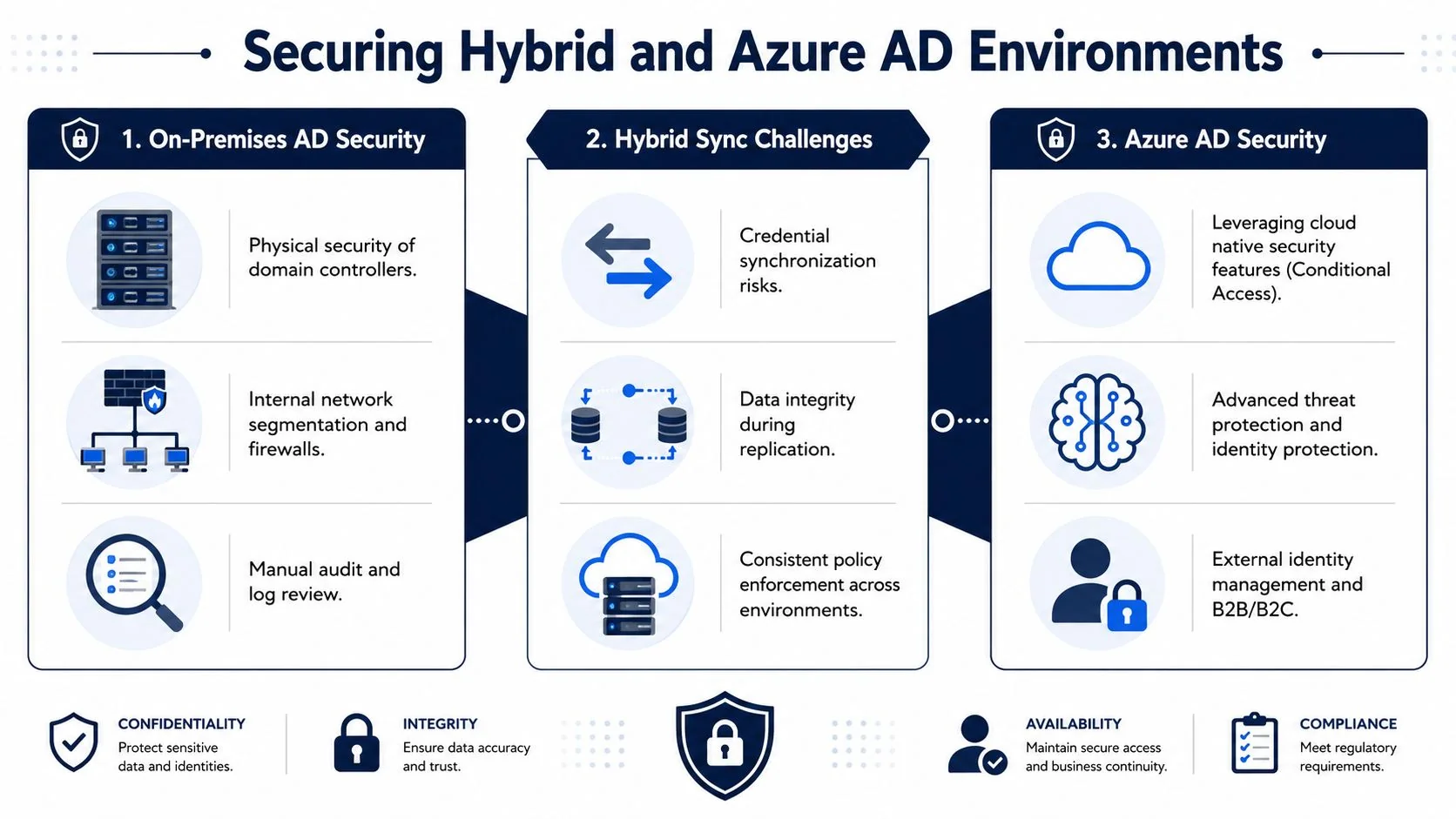
Where hybrid identity breaks audit narratives
Hybrid environments create a common audit problem. The company believes cloud access is secure because Conditional Access and MFA are enabled, but stale accounts in on premises AD still sync into the cloud. That means the identity lifecycle is only partially controlled.
Auditors notice this kind of split quickly. If a terminated employee account is disabled in one place but not reflected consistently across connected systems, your access removal control may fail in operation even if the policy is well written.
Typical weak points include:
- Misconfigured Azure AD Connect or sync rules that replicate more than intended
- Stale on premises groups that still grant cloud application access
- Password hash sync without matching access governance
- Break-glass cloud admin accounts that aren’t documented, tested, or monitored
The controls that usually work in hybrid setups
The answer isn’t to abandon AD. It’s to align identity control across both layers.
Use cloud-native controls where they fit best:
- Conditional Access to require MFA, restrict risky sign-ins, and block access from unmanaged contexts
- Privileged Identity Management (PIM) to reduce standing administrative privilege and require just-in-time elevation
- Identity Protection to detect suspicious sign-in patterns and user risk signals
- Access reviews for cloud roles, enterprise applications, and privileged groups
Use on premises controls where they still matter most:
- Authoritative account hygiene
- Restricted admin tiers
- GPO-backed endpoint restrictions
- Tight control over sync-scoped users and groups
The key design decision
You need to decide where identity authority lives for each use case. If HR-driven lifecycle changes flow into AD first, then cloud access control depends on how well that sync is governed. If cloud-native identities exist outside that process, auditors will want to know how those accounts are approved, reviewed, and removed.
A hybrid model can still be audit-ready if the control story is coherent. That means one provisioning process, one deprovisioning expectation, one privileged access standard, and one monitoring workflow, even if the enforcement points differ.
Hybrid identity fails audits when teams treat on premises and cloud directories as separate security programs. Auditors expect one control environment.
For SOC 2, consistency matters more than purity. You don’t need every identity in one platform. You do need documented ownership, controlled synchronization, privileged access limits, and reviewable logs across the full identity chain.
Your Prioritized AD Remediation Roadmap
Many organizations don’t need a complete Active Directory redesign to improve their audit position. They need a sequence. The best roadmap starts with the controls that reduce risk immediately and produce usable evidence fast.
The order that makes sense
-
Inventory and clean up first. Disable stale users, remove orphaned accounts, identify service accounts, and document privileged groups. If you skip this step, every later control sits on bad identity data.
-
Enforce the basics next. Apply strong password policy through GPO, require MFA for privileged and remote access, and separate standard accounts from admin accounts. This closes the most obvious gaps auditors and customers ask about.
-
Reduce standing privilege. Move away from broad admin membership, use delegated roles, tighten service account scope, and deploy LAPS or an equivalent control for local administrator password management.
-
Enable visibility and review. Turn on meaningful audit logging, forward logs to your SIEM, alert on privileged group changes, and review access on a defined schedule with evidence retained.
What to avoid while remediating
Don’t start with cosmetic policy updates if AD operations are still loose. Auditors can tell when the documentation says one thing and group membership says another. Don’t leave service accounts for “later” either. They’re often the gap that breaks least privilege in practice.
A good first milestone is being able to answer four questions confidently: who has admin rights, how access is approved, how access is removed, and what logs prove it. If your team can’t answer those quickly, start there.
The right next step after cleanup is to validate your broader control environment against your audit scope. If you’re preparing for a first report, SOC2Auditors’ guide to SOC 2 readiness is a practical place to benchmark what auditors will expect beyond identity alone.
A hardened and monitored Active Directory is not optional for most SOC 2 environments that depend on it. It supports logical access, privileged access restriction, monitoring, and evidence retention. If AD is part of your infrastructure, your SOC 2 audit readiness depends on whether it shows disciplined control operation, not just technical functionality.
More in Audit Preparation